Table of Contents
- Why Hide Prices for Out-of-Stock Products?
- 1. Improves User Experience
- 2. Reduces Bounce Rate
- 3. Prevents Price Comparison
- 4. Ideal for Wholesale & B2B Stores
- 5. Encourages Back-in-Stock Actions
- Method 1: Hide Prices Using WooCommerce Settings (Limited)
- Method 2: Hide Out-of-Stock Prices Using Custom Code (Recommended)
- Method 3: Replace Price with Custom Text (Better UX)
- Method 4: Hide Prices Only on Shop & Category Pages
- Method 5: Hide Prices for Variable Products When All Variations Are Out of Stock
- Final Thoughts
Displaying product prices when items are out of stock can confuse customers, reduce conversions, and lead to unnecessary support queries. In many WooCommerce stores—especially B2B, wholesale, or limited-inventory shops—it’s better to hide prices for out-of-stock products until they’re available again.
In this guide, you’ll learn why hiding out-of-stock prices matters, different methods to hide them, and step-by-step solutions using WooCommerce settings, code snippets.
Why Hide Prices for Out-of-Stock Products?
Before diving into the “how,” let’s understand the “why.”
1. Improves User Experience
Customers get frustrated when they see a price but can’t buy the product. Hiding prices avoids false expectations.
2. Reduces Bounce Rate
Visitors are more likely to leave if they repeatedly see unavailable products with visible prices.
3. Prevents Price Comparison
Competitors and price scrapers can track your pricing even when products aren’t available.
4. Ideal for Wholesale & B2B Stores
Many B2B stores only want to show prices when stock is confirmed.
5. Encourages Back-in-Stock Actions
You can replace the price with a “Notify Me” or “Coming Soon” message instead.
Method 1: Hide Prices Using WooCommerce Settings (Limited)
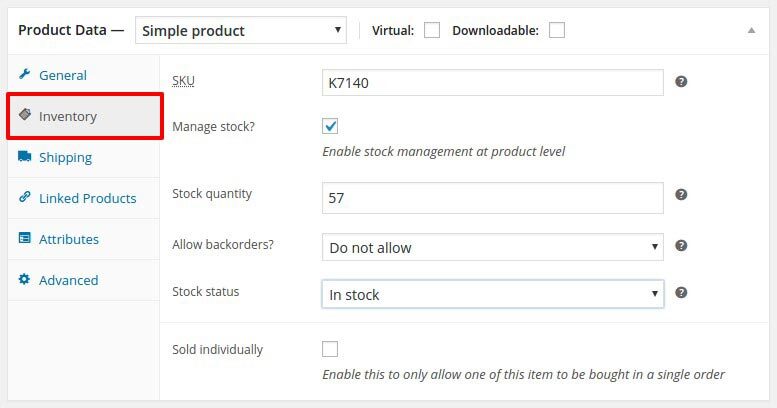
WooCommerce does not provide a built-in option specifically to hide prices for out-of-stock products, but you should still ensure stock management is enabled.
Steps:
- Go to WooCommerce → Settings → Products → Inventory
- Enable Manage stock
- Set Out of stock visibility if needed
Method 2: Hide Out-of-Stock Prices Using Custom Code (Recommended)
This is the cleanest and most flexible approach, especially for developers or custom WooCommerce sites.
Add This Code to functions.php
(Use a child theme or Code Snippets plugin)
add_filter( 'woocommerce_get_price_html', 'hide_price_when_out_of_stock', 10, 2 );
function hide_price_when_out_of_stock( $price, $product ) {
    if ( ! $product->is_in_stock() ) {
        return '';
    }
    return $price;
}
Method 3: Replace Price with Custom Text (Better UX)
Instead of hiding the price completely, you may want to show a message.
Example: Show “Out of Stock – Price Hidden”
add_filter( 'woocommerce_get_price_html', 'replace_price_for_out_of_stock', 10, 2 );
function replace_price_for_out_of_stock( $price, $product ) {
    if ( ! $product->is_in_stock() ) {
        return '<span class="out-of-stock-price">Out of stock</span>';
    }
    return $price;
}
You can customize the text:
- “Coming Soon”
- “Price Available When Back in Stock”
- “Contact Us for Pricing”
Method 4: Hide Prices Only on Shop & Category Pages
Some stores want prices hidden only on listing pages, but visible on single product pages.
add_filter( 'woocommerce_get_price_html', 'hide_price_on_shop_pages_only', 10, 2 );
function hide_price_on_shop_pages_only( $price, $product ) {
    if ( ! $product->is_in_stock() && ( is_shop() || is_product_category() ) ) {
        return '';
    }
    return $price;
}
Method 5: Hide Prices for Variable Products When All Variations Are Out of Stock
WooCommerce variable products sometimes still show prices even if all variations are unavailable.
add_filter( 'woocommerce_variable_price_html', 'hide_variable_price_if_out_of_stock', 10, 2 );
function hide_variable_price_if_out_of_stock( $price, $product ) {
    if ( ! $product->is_in_stock() ) {
        return '';
    }
    return $price;
}
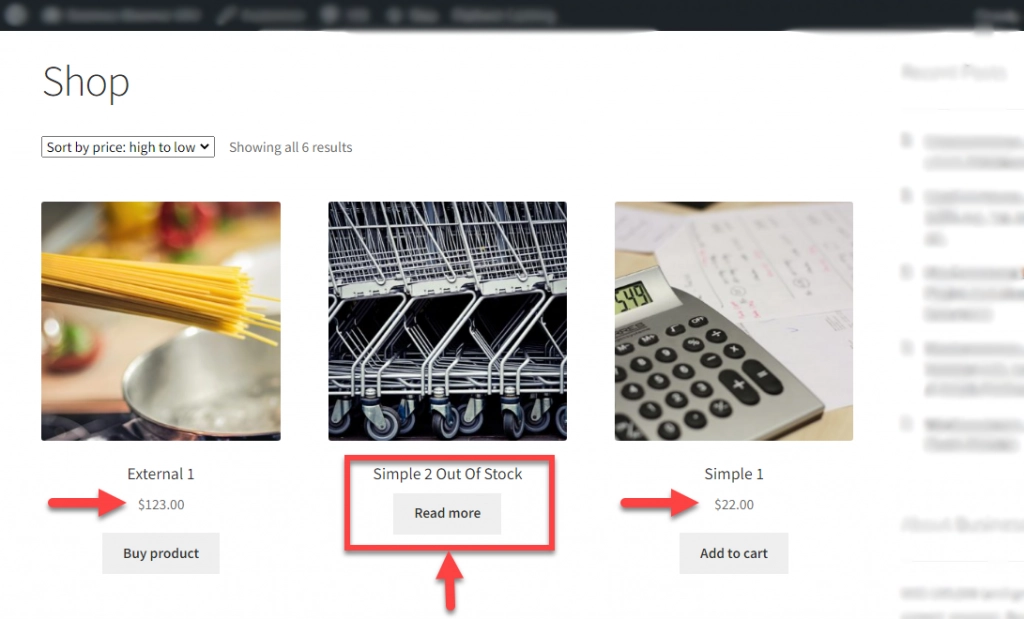
This is exactly how the FINAL OUTPUT will appear on the frontend when the product is out of stock and the price is hidden.
Final Thoughts
Hiding out-of-stock product prices in WooCommerce is a smart UX and conversion strategy, especially for stores with limited inventory or dynamic pricing.
Whether you choose:
- Custom code (best performance)
- Plugin solutions (ease of use)
- Hybrid approach (best UX)
…the key is to reduce customer frustration and guide them toward available products.
Need expert help customizing your WooCommerce store with specific features like hidden pricing? Partner with TechnoCrackers for reliable white-label WordPress development services.