Table of Contents
Elementor Tabs are great for organizing content, but by default they require users to click each tab manually. If you want a more dynamic experience—similar to a slider or carousel—you can make Elementor tabs auto-change at regular intervals. This approach improves engagement, highlights multiple pieces of content, and keeps your layout visually active.
In this article, we’ll explain what auto-changing tabs are, why they’re useful, and the different ways you can achieve this effect in Elementor.
What Does “Auto-Changing Tabs” Mean?
Auto-changing tabs behave like a slider:
- Tabs switch automatically after a set time (for example, every 3–5 seconds)
- Content rotates without user interaction
- Users can still click tabs manually if they want
This creates a smooth, animated experience similar to testimonials sliders, feature showcases, or step-by-step presentations.
Plugins Required
Before creating auto-changing tabs in Elementor, make sure the following plugins are installed and activated on your WordPress website:
- Elementor – Page builder plugin
- Elementor Pro – Required for advanced features and better control
- ElementsKit – Provides the Advanced Tabs widget with enhanced functionality
Step 1: Create the Tabs Layout
Follow these steps to create the tab structure using ElementsKit:
- Open the page where you want to add the tabs.
- Click Edit with Elementor.
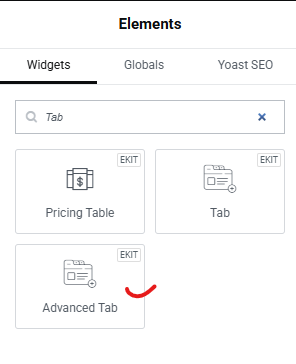
- In the Elementor editor panel, search for ElementsKit
- Drag and drop the Advanced Tab widget (from ElementsKit) onto your page.
- Choose the tab layout based on your design needs — Vertical or Horizontal.
- Add your tab titles and corresponding tab content for each tab.
- Design the tabs to match your website layout by adjusting:
- Colors
- Typography
- Spacing
- Icons and alignment
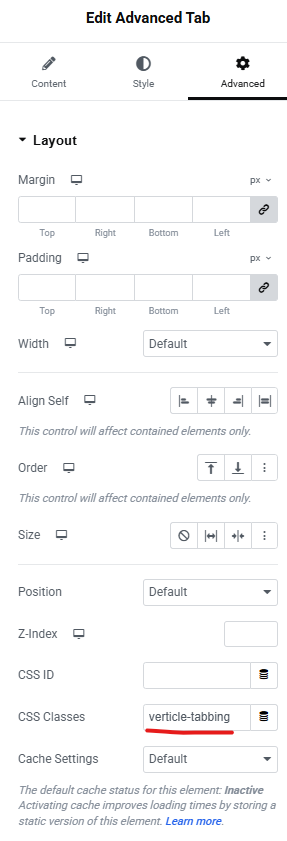
- Open the Advanced settings of the widget.
- Add a custom CSS class to the tab widget (this will be used later to enable auto-changing functionality).
Step 2: Convert Tabs to Auto-Change Like a Slider
Now that your tabs are created and styled, the next step is to make them auto-change automatically like a slider. This is done using a custom JavaScript script that switches tabs at a fixed time interval.
This method works smoothly with ElementsKit Advanced Tabs and uses Bootstrap’s native tab functionality for better compatibility.
What This Script Does
- Automatically switches tabs every 3 seconds
- Works with vertical or horizontal tabs
- Stops auto-sliding when a user manually clicks a tab
- Targets the widget using the custom CSS class you added earlier
How to Use the Script
- Copy the script provided below.
- Paste it into one of the following locations:
- Your theme’s php file (before </body>)
- A Custom Code plugin (recommended)
- Elementor → Custom Code → Location: Footer
- Save or publish the changes.
- Refresh the page and check the front end — your tabs should now auto-slide like a slider.
<script>
document.addEventListener("DOMContentLoaded", function () {
  document.querySelectorAll('.verticle-tabbing').forEach(wrapper => {
    const tabs = wrapper.querySelectorAll('.elementkit-nav-link');
    if (tabs.length < 2) return;
    let currentIndex = 0;
    let interval = null;
    function showTab(tab) {
      // Bootstrap 5
      if (window.bootstrap && bootstrap.Tab) {
        bootstrap.Tab.getOrCreateInstance(tab).show();
      }
      // Bootstrap 4 fallback
      else if (window.jQuery && jQuery.fn.tab) {
        jQuery(tab).tab('show');
      }
    }
    function startAutoplay() {
      if (interval) return;
      interval = setInterval(() => {
        showTab(tabs[currentIndex]);
        currentIndex = (currentIndex + 1) % tabs.length;
      }, 3000);
    }
    function stopAutoplay() {
      if (!interval) return;
      clearInterval(interval);
      interval = null;
    }
    // Wait for ElementsKit & Bootstrap to load
    setTimeout(startAutoplay, 1200);
    // Stop autoplay on manual tab click
    tabs.forEach(tab => {
      tab.addEventListener('click', stopAutoplay);
    });
  });
});
</script>
Final Thoughts
Making Elementor tabs auto change like a slider is a powerful way to enhance interactivity and engagement on your website. Whether you use custom JavaScript, an Elementor add-on, or a slider-based alternative, this technique can help present more content in less space—while keeping your design modern and dynamic.
With the right timing and thoughtful UX, auto-changing tabs can turn static layouts into engaging visual experiences.
If you’re planning a custom WordPress website or need advanced Elementor functionality without relying on heavy plugins, getting expert guidance early can save time and rework later.
You can Book a Free WordPress Consultation with our team to discuss your requirements, explore the best technical approach, and ensure your site is built for performance and scalability.