




Table of Contents
Images play a major role in SEO. When your image file names and titles are optimized correctly, search engines can better understand your content — helping you rank higher in Google Image Search and improving overall keyword relevance.
But updating image file names manually can be risky. One wrong step and your pages may break, leaving broken image links across your website.
The good news? You can bulk update image file names and titles safely in WordPress using a powerful tool: Phoenix Media Rename.
In this guide, you’ll learn:
- Why optimized image names help SEO
- How to rename images safely without breaking pages
- How Phoenix Media Rename automatically updates all internal links
- Best practices for SEO-friendly file names
- Tips for bulk renaming efficiently
Step 1: Install Phoenix Media Rename
- Go to Plugins → Add New
- Search “Phoenix Media Rename”
- Install & activate
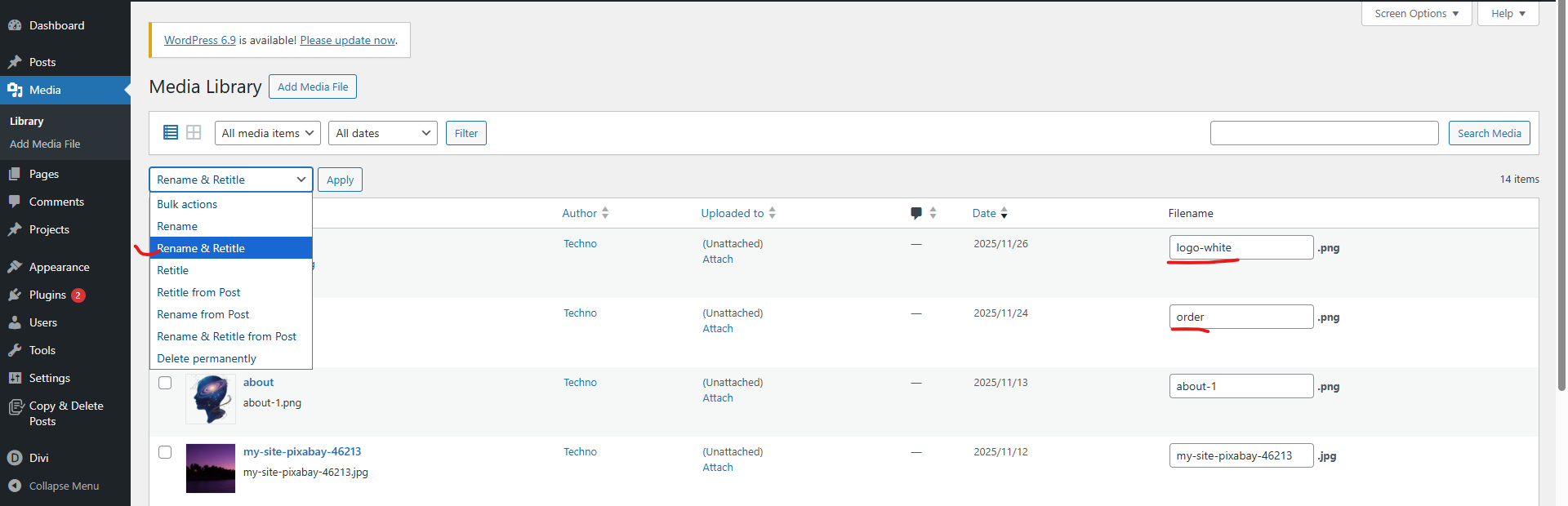
Step 2: Bulk Rename Images (Individually or in Groups)
- Go to Media → Library → List View
- You will see a new rename field next to each image
- Update the file name and title
- Then select Rename & Retitle
- Then click on apply for update
Benefits of Phoenix Media Rename for SEO
- Boosts image search visibility
- Fixes messy media libraries
- Prevents broken URLs
- Keeps all page layouts intact
- Helps search engines understand your content better
- Speeds up images optimization
Conclusion
Renaming image file names is one of the simplest yet most powerful SEO improvements you can make — but it must be done safely.
With Phoenix Media Rename, you can bulk rename image files and update titles across your entire WordPress site without breaking a single link.
If you’re serious about improving SEO, cleaning up your media names is a highly effective step.
If you’re managing a WordPress site with hundreds (or thousands) of images and need bulk SEO-friendly updates without risking content or rankings, our team can handle the entire process—from planning and execution to validation and rollout.
You can Schedule a Free Consultation to discuss your site structure, SEO concerns, and how we can safely implement large-scale WordPress changes for you.