





Table of Contents
- What Are Breadcrumbs?
- What Is the Divi 5 Breadcrumbs Module?
- How to Add Breadcrumbs in Divi 5
- Step 1: Open the Divi Visual Builder
- Step 2: Add the Breadcrumbs Module
- Step 3: Configure the Breadcrumbs
- Customize the Breadcrumbs Content
- Style Your Breadcrumbs
- Use Breadcrumbs in the Divi Theme Builder
- Breadcrumbs and SEO
- Divi 5 Breadcrumbs Best Practices
- Keep Labels Short
- Use a Simple Separator
- Make Links Easy to Identify
- Don’t Make Them Too Prominent
- Check Mobile Layouts
- Use Theme Builder Templates
- Final Thoughts
Breadcrumbs are a simple but useful navigation feature that helps visitors understand where they are on a website.
With Divi 5, you can now add breadcrumb navigation directly using the built-in Breadcrumbs module, without needing to create a custom breadcrumb layout from scratch.
In this guide, we’ll look at how the Divi 5 Breadcrumbs module works, explore its main settings, and show you how to add and style breadcrumbs on your website.
What Are Breadcrumbs?
Breadcrumbs are a secondary navigation trail that shows the path a visitor has taken through your website.
For example:
Home → Blog → Divi → Divi 5 Tutorials → Current Post
They are especially useful for websites with multiple levels of content, such as:
- Blogs
- Documentation websites
- Resource libraries
- Service websites
- Online courses
- Knowledge bases
Breadcrumbs give visitors an easy way to move back to a parent page or category without having to return to the main navigation.
What Is the Divi 5 Breadcrumbs Module?
Divi 5 includes a native Breadcrumbs module that you can add directly from the Visual Builder.
The module creates a navigation trail based on the structure of your website and provides options for customizing its content and appearance.
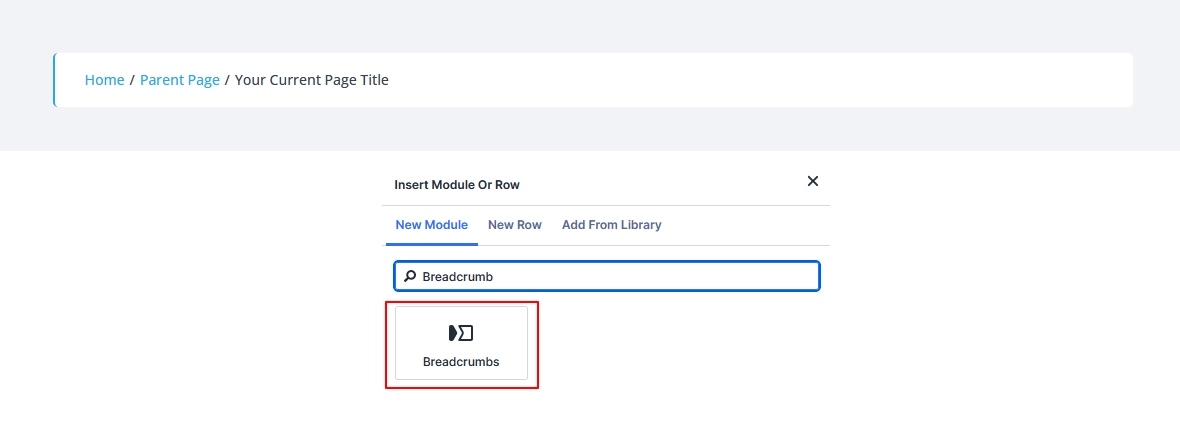
One important point is that this is the general Breadcrumbs module for your website. If you’re working with WooCommerce products, Divi also has a separate WooCommerce breadcrumb option.
How to Add Breadcrumbs in Divi 5
Adding breadcrumbs is straightforward.
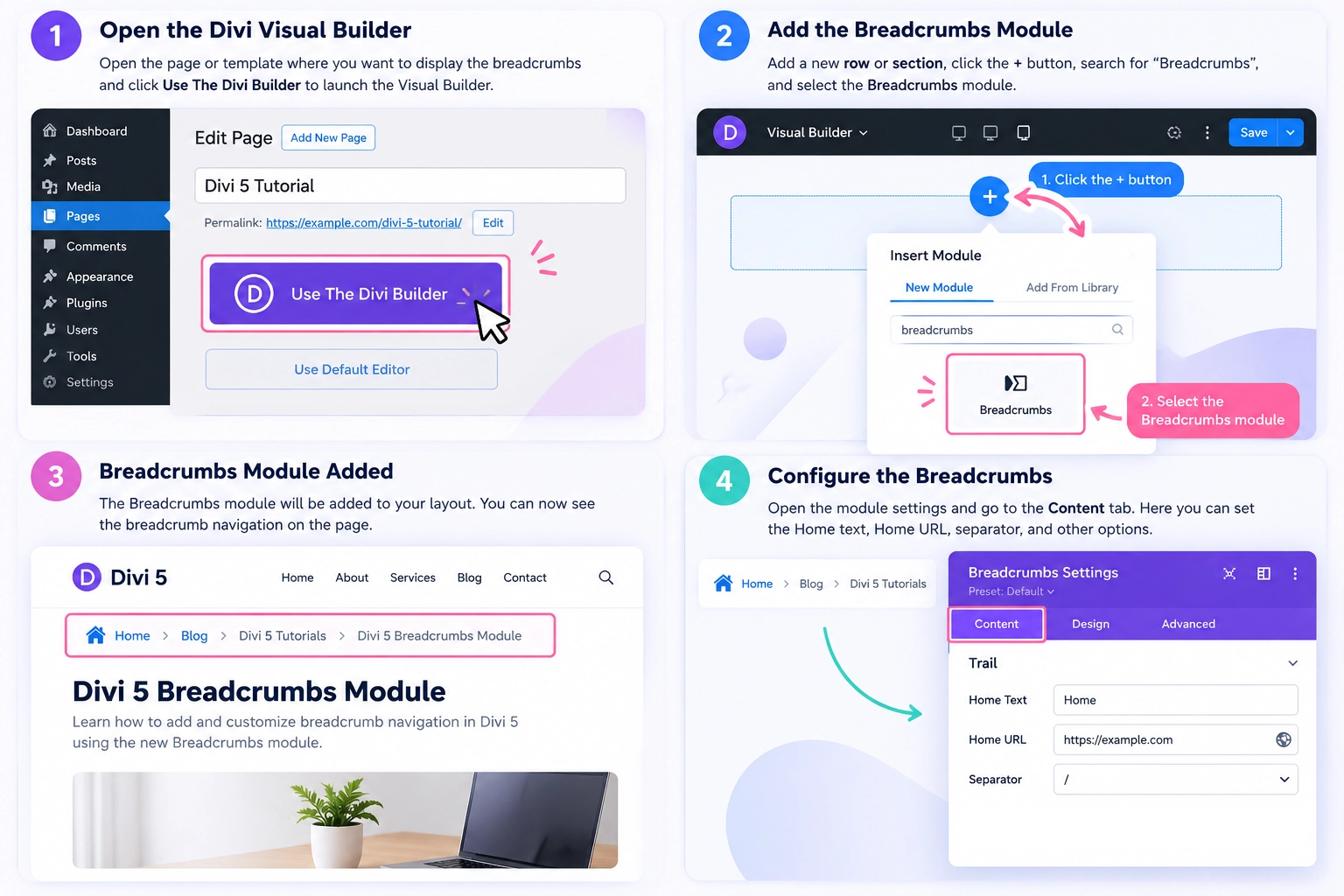
Step 1: Open the Divi Visual Builder
Open the page or template where you want to display the breadcrumb navigation.
If you want breadcrumbs to appear automatically across multiple blog posts, you can add the module to a Divi Theme Builder post template.
Step 2: Add the Breadcrumbs Module
Add a new row or section where you want the breadcrumbs to appear.
Click the Add Module button and search for Breadcrumbs.
Select the module to add it to your layout.
Step 3: Configure the Breadcrumbs
Open the module settings and go to the Content tab.
Here you can configure the basic breadcrumb options.
Customize the Breadcrumbs Content
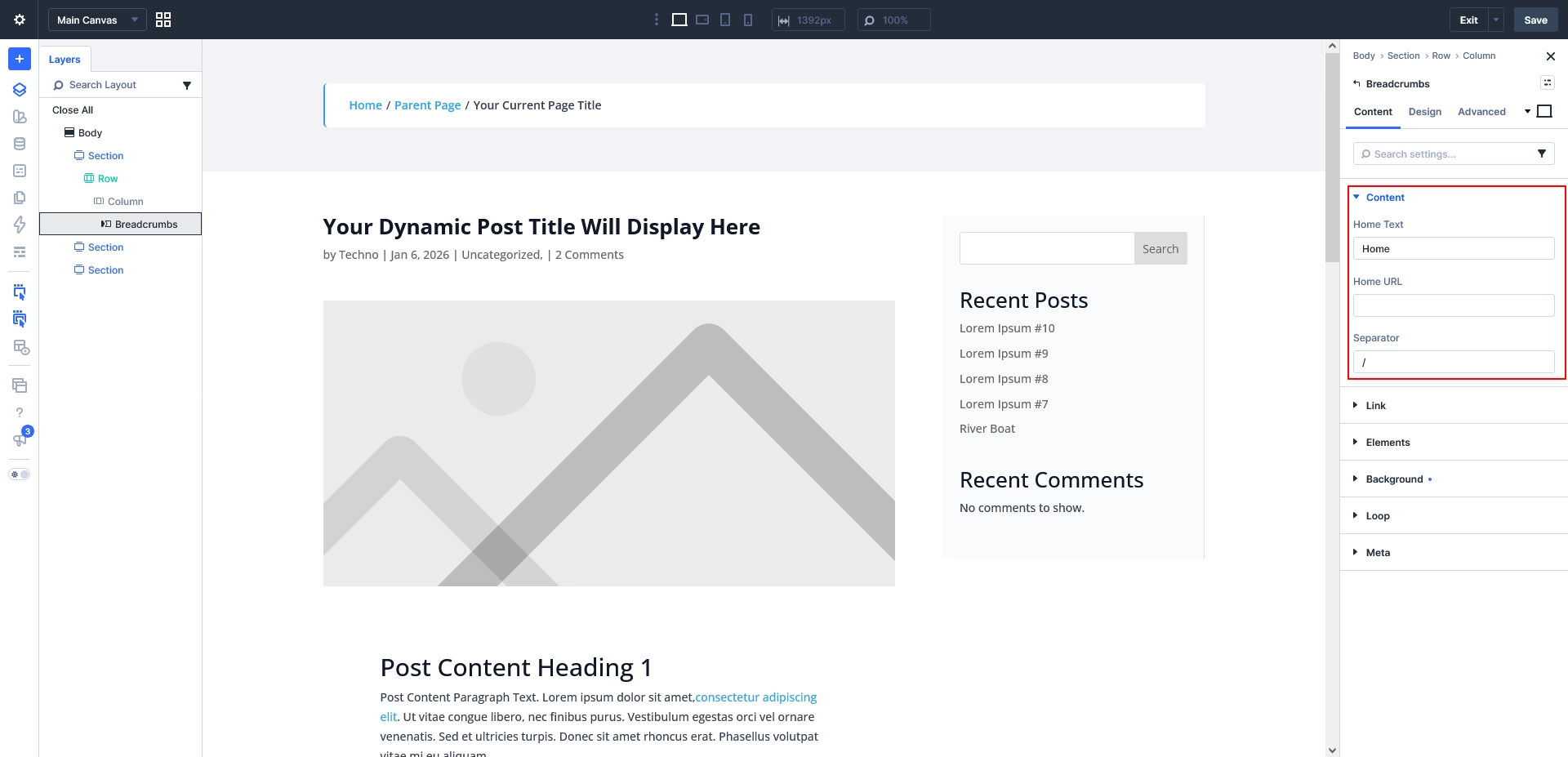
The Content tab gives you control over how the breadcrumb trail is displayed.
Some of the useful options include:
Home Text
Choose the label for the first breadcrumb item.
For example:
Home
You can also use a different label if it better matches your website structure, such as Blog, Resources, or Docs.
Home URL
Choose where the first breadcrumb item should link.
For most websites, this will be the homepage, but you can use another relevant page if needed.
Separator
The separator appears between each breadcrumb item.
For example:
Home / Blog / Divi / Current Post
You can choose a separator style that matches your website design.
Keep the separator simple so the navigation remains easy to scan.
Style Your Breadcrumbs
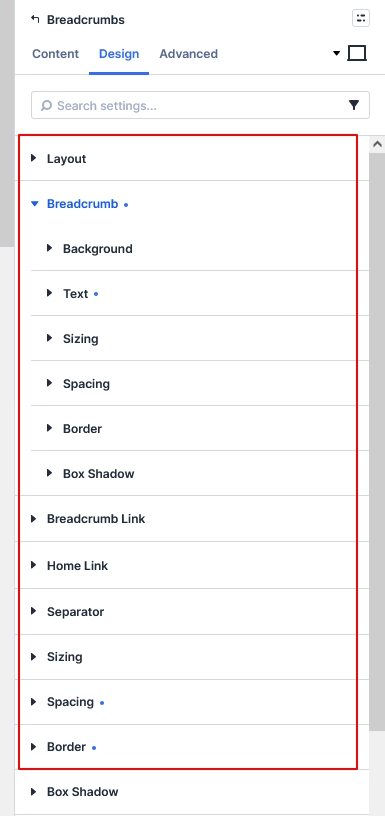
Once the content is configured, switch to the Design tab.
Divi 5 gives you several controls for adjusting the appearance of the breadcrumb trail.
You can customize things such as:
- Breadcrumb typography
- Link colors
- Home link styling
- Separator styling
- Spacing
- Alignment
- Width and sizing
- Borders
- Box shadows
You can also style different parts of the breadcrumb trail independently.
Keep the Design Simple
Breadcrumbs are meant to support navigation, so they shouldn’t compete with your page title or main content.
A simple design with smaller text and a subtle color usually works well.
For example:
Home / Blog / Divi 5 / Article Title
You can make the clickable links slightly more prominent while keeping the current page text more subtle.
Use Breadcrumbs in the Divi Theme Builder
One of the most useful ways to use the Breadcrumbs module is through the Divi Theme Builder.
Instead of adding breadcrumbs manually to every blog post, you can add the module once to your post template.
For example, your template could follow this structure:
Featured Image → Breadcrumbs → Post Title → Post Content
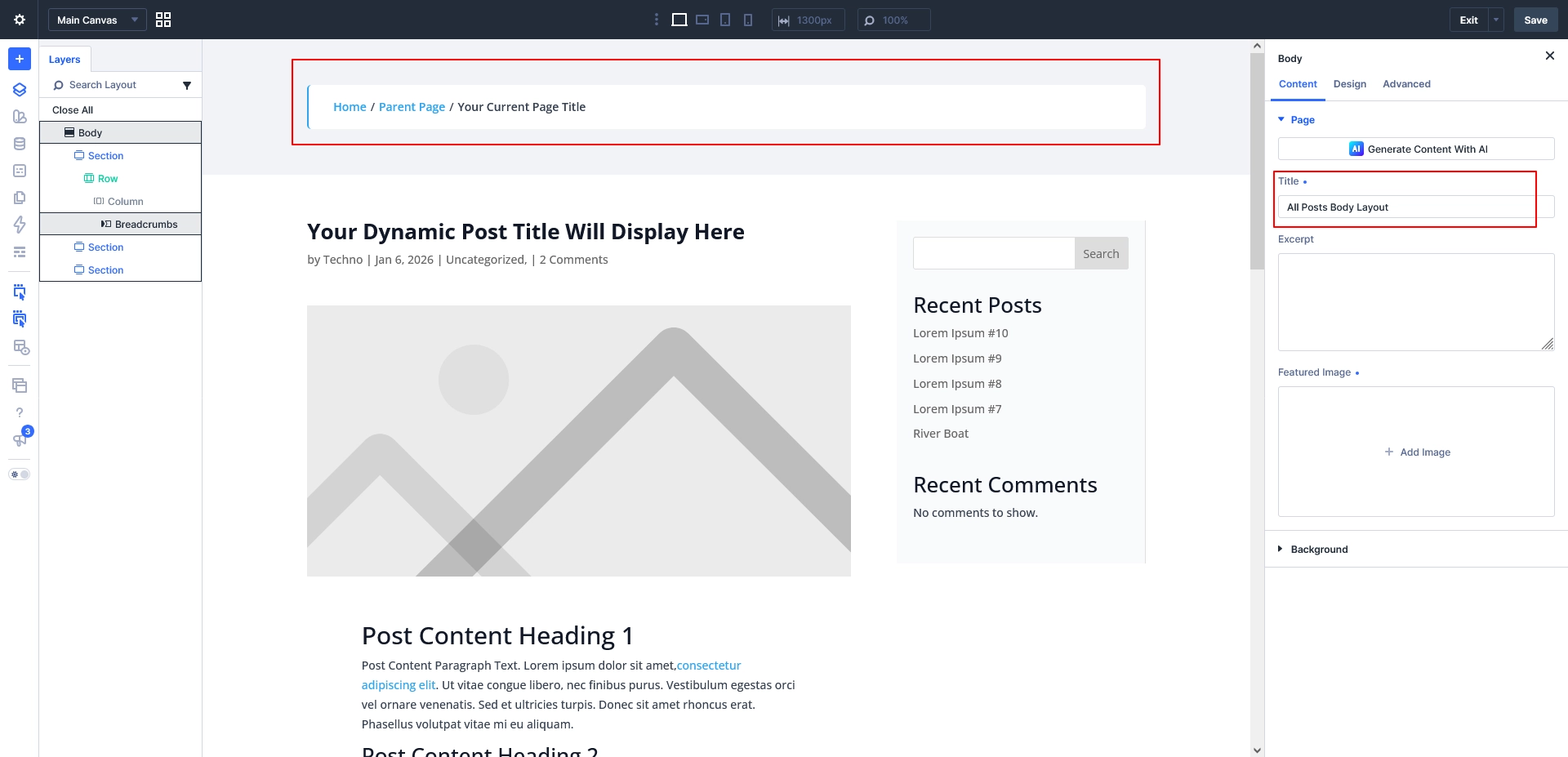
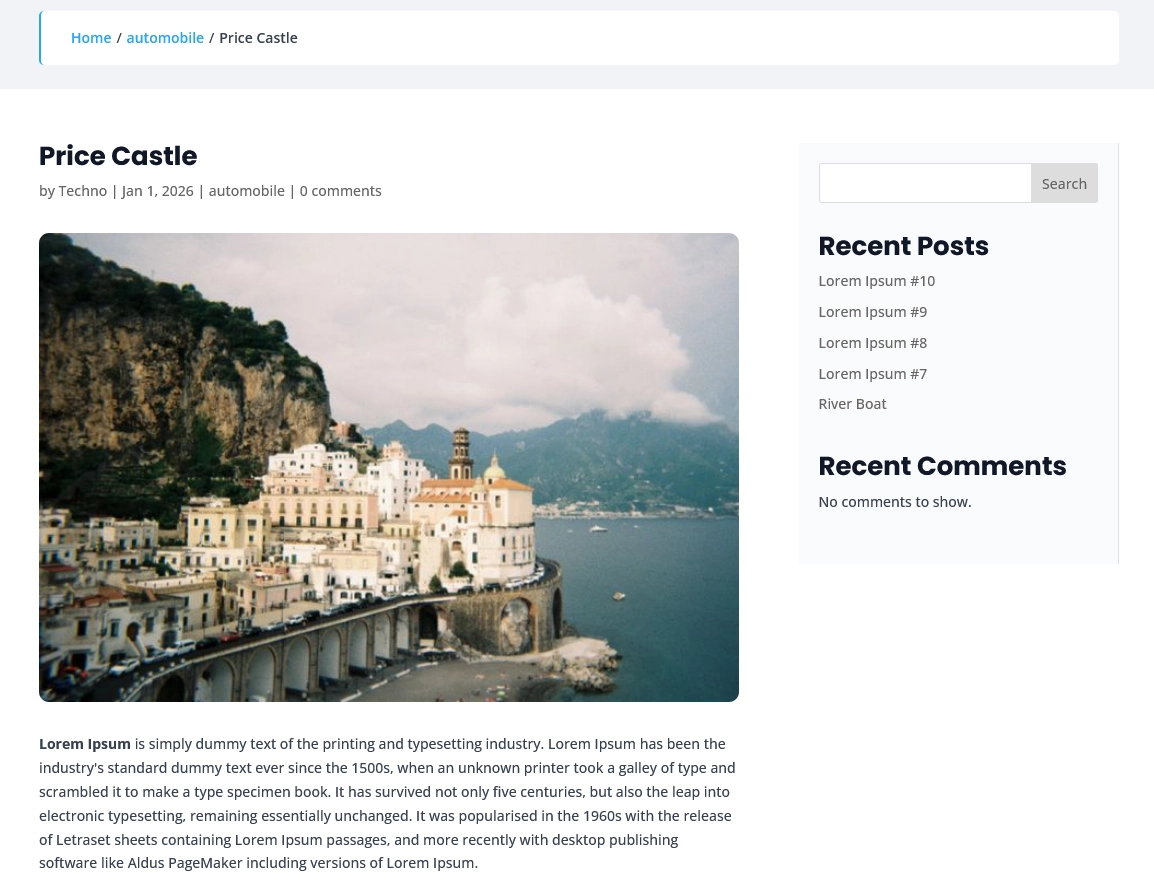
This allows the breadcrumb navigation to appear automatically on the posts assigned to that template.
This approach is particularly useful for:
- Blog websites
- Documentation sites
- Resource sections
- Tutorial websites
- Large content libraries
Breadcrumbs and SEO
Breadcrumbs can also help communicate your website’s content structure.
For visitors, they provide context and an easy way to navigate back to higher-level pages.
For SEO, breadcrumbs can complement your site’s internal linking and overall hierarchy. However, visible breadcrumbs and breadcrumb structured data are separate considerations, so make sure your SEO setup is also configured appropriately.
Breadcrumbs should be viewed as a navigation and usability feature first, rather than an SEO shortcut.
Divi 5 Breadcrumbs Best Practices
Here are a few simple recommendations when adding breadcrumbs to your website:
Keep Labels Short
Use concise labels that visitors can understand quickly.
Use a Simple Separator
A slash, arrow, or similar subtle separator is usually enough.
Make Links Easy to Identify
Visitors should be able to tell which breadcrumb items are clickable.
Don’t Make Them Too Prominent
Breadcrumbs should support the page content rather than compete with the main heading.
Check Mobile Layouts
Always test long breadcrumb trails on smaller screens.
Use Theme Builder Templates
For blogs and other content-heavy websites, adding breadcrumbs to a reusable template can save time and maintain consistency.
Final Thoughts
The new Divi 5 Breadcrumbs module provides a simple way to add structured navigation to your website without relying on a separate breadcrumb layout.
You can configure the breadcrumb content, customize its appearance, and add it to Theme Builder templates so it can be reused across your site.
If your website contains multiple levels of content, adding breadcrumbs can make navigation clearer and help visitors understand where they are within your site’s structure.
With a few simple styling adjustments, you can also make the breadcrumb trail fit naturally into your existing Divi 5 design system.