Table of Contents
- Mini Glossary
- Displaying Simple Posts with the Divi Blog Module
- Custom Post Types with the Blog Module: Limited but Functional
- Custom Post Types + Custom Fields Using Divi 5 Loop Builder
- How Divi 5 Loop Builder Works
- Examples with Custom Post Types and Custom Fields
- Flexbox Layouts for Custom Designs
- Divi Blog Module vs Divi 5 Loop Builder: Key Differences
- When the Blog Module Is Ideal
- When Divi 5 Loop Builder Is the Better Choice
- Final Thoughts
Divi has long been one of the most popular WordPress themes for building blogs, business websites, and dynamic content layouts. With the introduction of Divi 5’s Loop Builder, users now have two powerful—but very different—ways to display posts and custom content.
So which one should you use?
In this guide, we’ll compare the Divi Blog Module and Divi 5 Loop Builder, explain how they work, highlight their strengths and limitations, and help you choose the right tool for your project.
Mini Glossary
Before we dive in, here are a few key terms you’ll see throughout this blog:
- Blog Module – A classic Divi module designed to display posts in grid or full-width layouts.
- Loop Builder – A Divi 5 feature that lets you design custom layouts that repeat for each post or item.
- Custom Post Type (CPT) – Content types beyond posts and pages (e.g., Portfolio, Resources, Attorneys).
- Custom Fields – Extra data added to posts using tools like ACF (Advanced Custom Fields).
- Dynamic Content – Content pulled automatically from WordPress data instead of being hard-coded.
Displaying Simple Posts with the Divi Blog Module
The Divi Blog Module is the fastest and easiest way to display blog posts on a page. It’s ideal for standard blogging needs where simplicity and speed matter more than advanced customization.
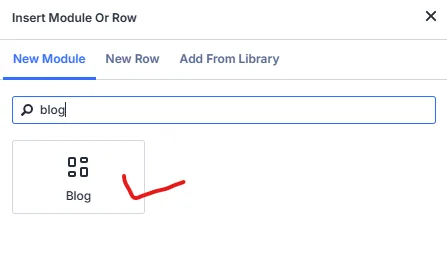
Key Features of the Blog Module
- Grid or full-width blog layouts
- Automatic post queries
- Category, tag, and author filtering
- Built-in pagination
- Featured image, title, meta, and excerpt display
- Minimal setup required
When the Blog Module Works Best
- Standard blogs and news pages
- Marketing or company websites
- Personal blogs
- Simple archive layouts
- Users who prefer no-code solutions
Custom Post Types with the Blog Module: Limited but Functional
The Blog Module can display custom post types, but with restrictions.
What You Can Do
- Select a custom post type (e.g., Portfolio, Resources)
- Show title, featured image, date, and excerpt
- Apply basic layout styling
Limitations
- Cannot display custom fields easily
- Layout options are fixed
- No conditional logic
- Limited design flexibility
- Hard to build unique layouts for complex data
If your custom post type only needs a basic listing, the Blog Module is sufficient. But for anything more advanced, you’ll quickly hit a wall.
Custom Post Types + Custom Fields Using Divi 5 Loop Builder
This is where Divi 5 Loop Builder truly shines.
Loop Builder allows you to design one custom layout and repeat it dynamically for each post, resource, or item—similar to how templates work in modern WordPress builders.
How Divi 5 Loop Builder Works
- Enable Loop Builder in Divi 5
- Create a layout using Divi modules
- Bind modules to dynamic data (post title, image, ACF fields, etc.)
- Apply the loop to posts, CPTs, or taxonomies
- Style once, repeat everywhere
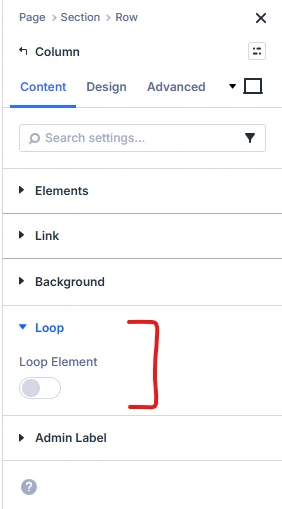
Every item in the loop uses the same design but displays different content automatically.
Examples with Custom Post Types and Custom Fields
Loop Builder is perfect for advanced content structures such as:
- Attorneys with phone numbers, emails, and practice areas
- Resources with download buttons and file links
- WooCommerce-style product listings
- Testimonials with ratings and client names
- Team members with roles and social profiles
Instead of forcing content into a fixed blog layout, you design exactly what you need.
Flexbox Layouts for Custom Designs
One of the biggest advantages of Loop Builder in Divi 5 is Flexbox support.
Benefits of Flexbox in Loop Builder
- Precise alignment control
- Equal-height cards
- Responsive layouts without hacks
- Horizontal and vertical stacking
- Cleaner mobile designs
This makes Loop Builder ideal for modern, card-based layouts and complex grid systems.
Divi Blog Module vs Divi 5 Loop Builder: Key Differences
| Feature | Blog Module | Loop Builder |
| Ease of Use | Very easy | Moderate |
| Custom Layout Control | Limited | Full |
| Custom Fields Support | No | Yes |
| Custom Post Types | Basic | Advanced |
| Flexbox Support | No | Yes |
| Dynamic Content | Limited | Extensive |
| Best for Beginners | Yes | No |
| Best for Developers | No | Yes |
When the Blog Module Is Ideal
Use the Divi Blog Module if:
- You need a quick blog listing
- You’re displaying standard posts
- You don’t use custom fields
- You want minimal setup
- Performance and simplicity are priorities
When Divi 5 Loop Builder Is the Better Choice
Use Loop Builder if:
- You’re working with custom post types
- You rely on ACF or custom fields
- You need unique layouts per item
- You want modern, flexible designs
- You’re building scalable or data-driven sites
Final Thoughts
The Divi Blog Module is perfect for simple blogging and fast content display.
The Divi 5 Loop Builder is a powerful, future-ready solution for advanced layouts, custom post types, and dynamic data.
If you’re building a basic blog, stick with the Blog Module.
If you’re creating complex WordPress websites with structured content, Divi 5 Loop Builder is the clear winner.
Need expert help with Divi Blog layouts or advanced Loop Builder setups?
TechnoCrackers offers custom solutions that match your vision—Reach out today!