Table of Contents
- What is an Accordion?
- Why Avoid Scripts or Plugins?
- The Native HTML Solution: <details> and <summary>
- Step-by-Step Guide to Create an Accordion in WordPress
- Step 1: Open the WordPress Editor
- Step 2: Add a Custom HTML Block
- Step 3: Add Accordion Code
- Step 4: Preview Your Accordion
- Enhancing the Accordion with CSS
- Limitations of This Approach
- Conclusion
Creating an accordion in WordPress is a common requirement, especially for FAQs, product details, or content-heavy pages where you want to save space and improve user experience. While many users rely on plugins or JavaScript-based solutions, WordPress actually allows you to create a simple and effective accordion using only built-in features and standard HTML—no scripts required.
In this blog, we will walk you through a clean, lightweight, and fully functional way to create an accordion using default WordPress capabilities.
What is an Accordion?
An accordion is a user interface (UI) component that lets users expand and collapse sections of content. Each section has a heading, and when clicked, it reveals or hides the associated content. This helps keep pages organized and prevents users from being overwhelmed by too much information at once.
Accordions are commonly used for:
- Frequently Asked Questions (FAQs)
- Product descriptions
- Service details
- Tutorials and guides
Why Avoid Scripts or Plugins?
Using plugins or JavaScript for simple UI elements like an accordion can sometimes be unnecessary. Here are a few reasons why you might prefer a no-script solution:
- Better Performance: Fewer scripts mean faster page load times
- Improved Security: No dependency on third-party code
- Simplicity: Easy to implement and maintain
- Compatibility: Works across modern browsers without issues
By using native HTML elements, you can achieve the same functionality in a much cleaner way.
The Native HTML Solution: <details> and <summary>
HTML5 introduced two very useful elements: <details> and <summary>. These elements are specifically designed to create expandable and collapsible sections—exactly what an accordion does.
- <details> acts as the container
- <summary> is the clickable heading
When a user clicks on the summary, the content inside the details tag expands or collapses automatically—no JavaScript needed.
Step-by-Step Guide to Create an Accordion in WordPress
Follow these steps to create your accordion:
Step 1: Open the WordPress Editor
Go to your WordPress dashboard and open the page or post where you want to add the accordion.
Step 2: Add a Custom HTML Block
Click on the “+” (Add Block) button and search for Custom HTML. Select it to insert a block where you can write HTML code.
Step 3: Add Accordion Code
Paste the following code into the Custom HTML block:
<details>
   <summary>What is Lorem Ipsum?</summary>
   <p>Lorem Ipsum is simply dummy text of the printing and typesetting industry. Lorem Ipsum has been the industry's standard dummy text ever since the 1500s, when an unknown printer took a galley of type and scrambled it to make a type specimen book.</p>
</details>

<details>
   <summary>What is Lorem Ipsum?</summary>
   <p>Lorem Ipsum is simply dummy text of the printing and typesetting industry. Lorem Ipsum has been the industry's standard dummy text ever since the 1500s, when an unknown printer took a galley of type and scrambled it to make a type specimen book.</p>
</details>

<details>
   <summary>What is Lorem Ipsum?</summary>
   <p>Lorem Ipsum is simply dummy text of the printing and typesetting industry. Lorem Ipsum has been the industry's standard dummy text ever since the 1500s, when an unknown printer took a galley of type and scrambled it to make a type specimen book.</p>
</details>
Step 4: Preview Your Accordion
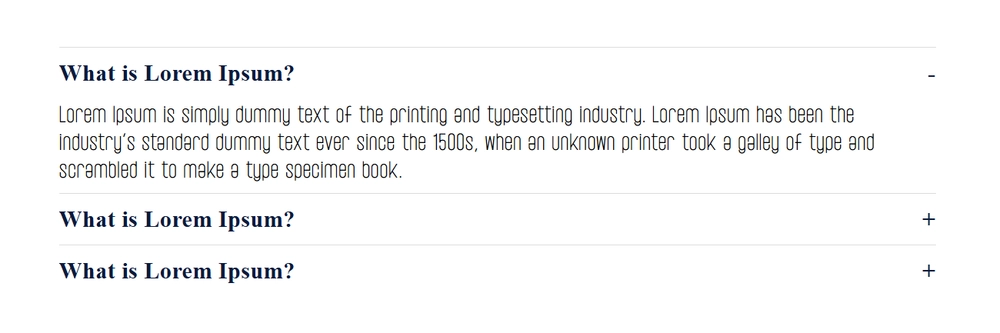
Click on the Preview button to see how your accordion looks on the front end. You’ll notice that each section expands and collapses smoothly when clicked.
Enhancing the Accordion with CSS
While the default appearance is functional, you can improve the design using simple CSS. This step is optional but recommended for a better user experience.
Add Custom CSS
Go to Appearance → Customize → Additional CSS and add the following:
details {
  margin-bottom: 12px;
  border: 1px solid #ddd;
  border-radius: 6px;
  padding: 12px;
  background-color: #ffffff;
}
summary {
  font-weight: 600;
  font-size: 16px;
  cursor: pointer;
  outline: none;
}
details[open] {
  background-color: #f5f5f5;
}
summary::marker {
  color: #0073aa;
}
This will:
- Add spacing and borders
- Improve readability
- Highlight open sections
- Enhance the clickable area
Limitations of This Approach
While this method is powerful and simple, it does have a few limitations:
- No Advanced Animation: You won’t get smooth sliding effects without additional CSS tricks
- Limited Control: Behavior is browser-controlled
- Basic Styling: Requires custom CSS for advanced design
However, for most use cases, these limitations are minor compared to the benefits.
Conclusion
Creating an accordion in WordPress without using scripts is not only possible but also highly efficient. By leveraging the native <details> and <summary> HTML elements, you can build a clean, functional, and user-friendly accordion with minimal effort.
This approach keeps your website lightweight, improves performance, and reduces dependency on external tools. Whether you’re building a blog, business site, or eCommerce store, this method is a practical solution for organizing content effectively.
Start using this technique today and simplify your WordPress design process without compromising functionality.
Scale Your WordPress Projects with White Label Support
If you’re building custom WordPress solutions and want to deliver faster without increasing your internal workload, partnering with a reliable white label WordPress development team can make all the difference. At Technocrackers, we help agencies and businesses handle everything from custom features to advanced WordPress implementations while you focus on growing your brand.
Schedule a free consultation to discuss how our white label WordPress development services can support your next project.