





Table of Contents
- What Are Date-Based Filters?
- Why Use JetSmartFilters With Divi?
- Step 1: Install Required Plugins
- Step 2: Create Dynamic Listings
- Step 3: Add Listing Items
- Step 4: Create Listing Template
- Step 5: Add Listing Grid in Divi
- Step 6: Create Date-Based Filters
- Step 7: Connect Filters With Listing Grid
- Step 8: Customize Filter Design
- Benefits of Date-Based Filters
- Improved User Experience
- Faster Navigation
- Better Website Organization
- Increased Engagement
- Professional Dynamic Websites
- Best Use Cases for Date Filters
- Final Thoughts
Creating advanced filtering systems is one of the best ways to improve user experience on dynamic WordPress websites. If you’re building event websites, blog archives, directories, or custom listing platforms in Divi, date-based filters can help visitors quickly find relevant content.
With the combination of Divi, JetEngine, and JetSmartFilters, you can easily create filters like:
- Upcoming
- This Month
- Last 3 Months
- This Year
- Last Year
In this tutorial, we’ll walk through how to create dynamic date-based filters in Divi using JetSmartFilters.
What Are Date-Based Filters?
Date-based filters allow users to filter content according to specific time periods.
For example:
| Filter Type | Purpose |
| Upcoming | Show future events |
| This Month | Show current month content |
| Last 3 Months | Display recent posts or events |
| This Year | Show content from current year |
| Last Year | Display previous year data |
These filters are especially useful for:
- Event websites
- Blog archives
- News portals
- Real estate listings
- Business directories
- Educational platforms
Why Use JetSmartFilters With Divi?
Divi provides a flexible visual builder, while JetSmartFilters adds powerful AJAX-based filtering functionality.
Together, they help you:
- Create advanced filters visually
- Filter dynamic listings instantly
- Improve user experience
- Reduce page reloads
- Build interactive websites without coding
Step 1: Install Required Plugins
Before starting, install and activate:
- Divi
- JetEngine
- JetSmartFilters
JetEngine is used for dynamic listings, while JetSmartFilters handles filtering functionality.
Step 2: Create Dynamic Listings
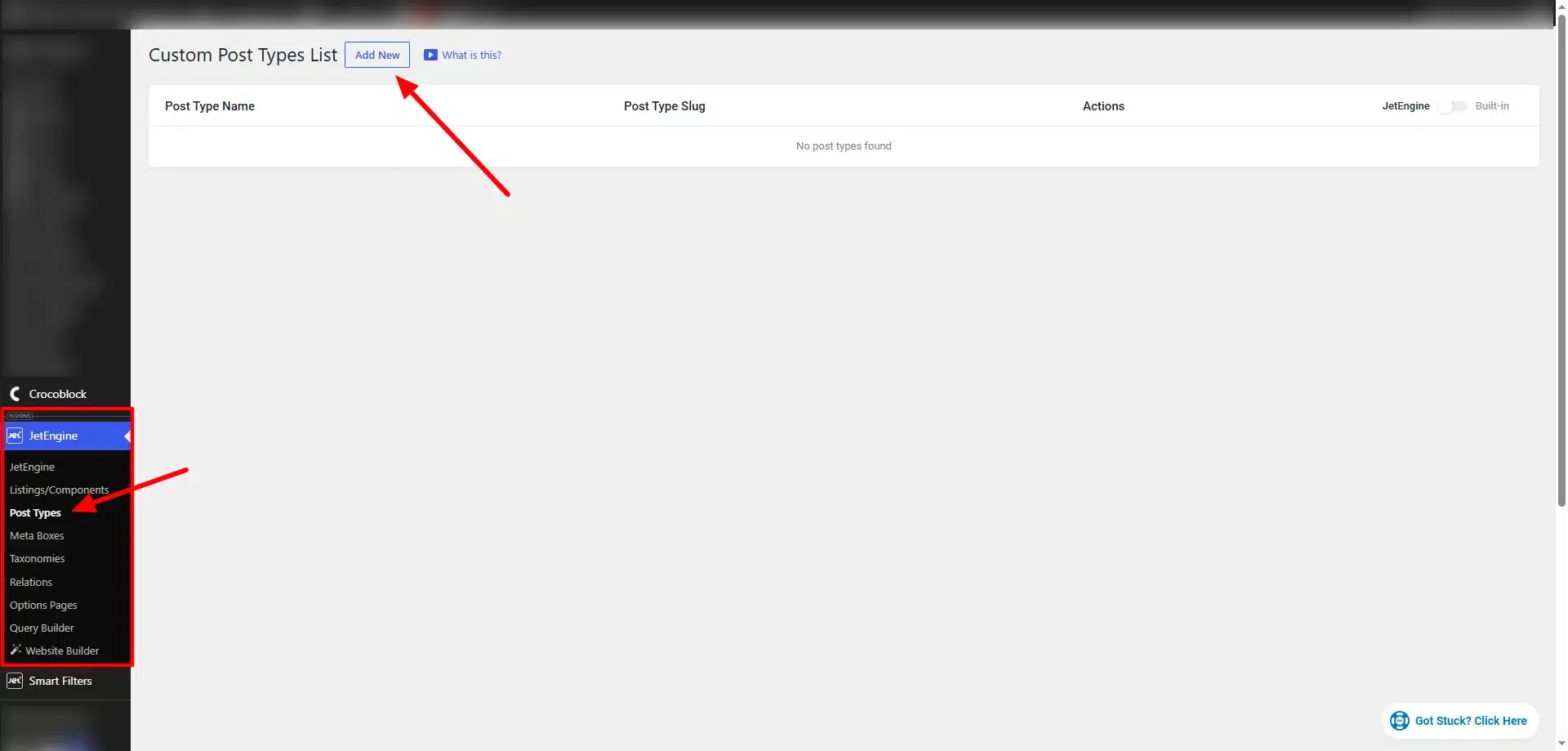
First, create your listing content.
Go to:
JetEngine → Post Types
Create your custom post type.
Examples:
- Events
- News
- Webinars
- Blog Posts
- Properties
Then add a date field using Meta Boxes.
Example field:
event_date
This field will store the date used for filtering.
Step 3: Add Listing Items
Now add your actual content.
Example:
Events → Add New
Fill in:
- Title
- Featured Image
- Description
- Event Date
Repeat for multiple posts or events.
Step 4: Create Listing Template
Go to:
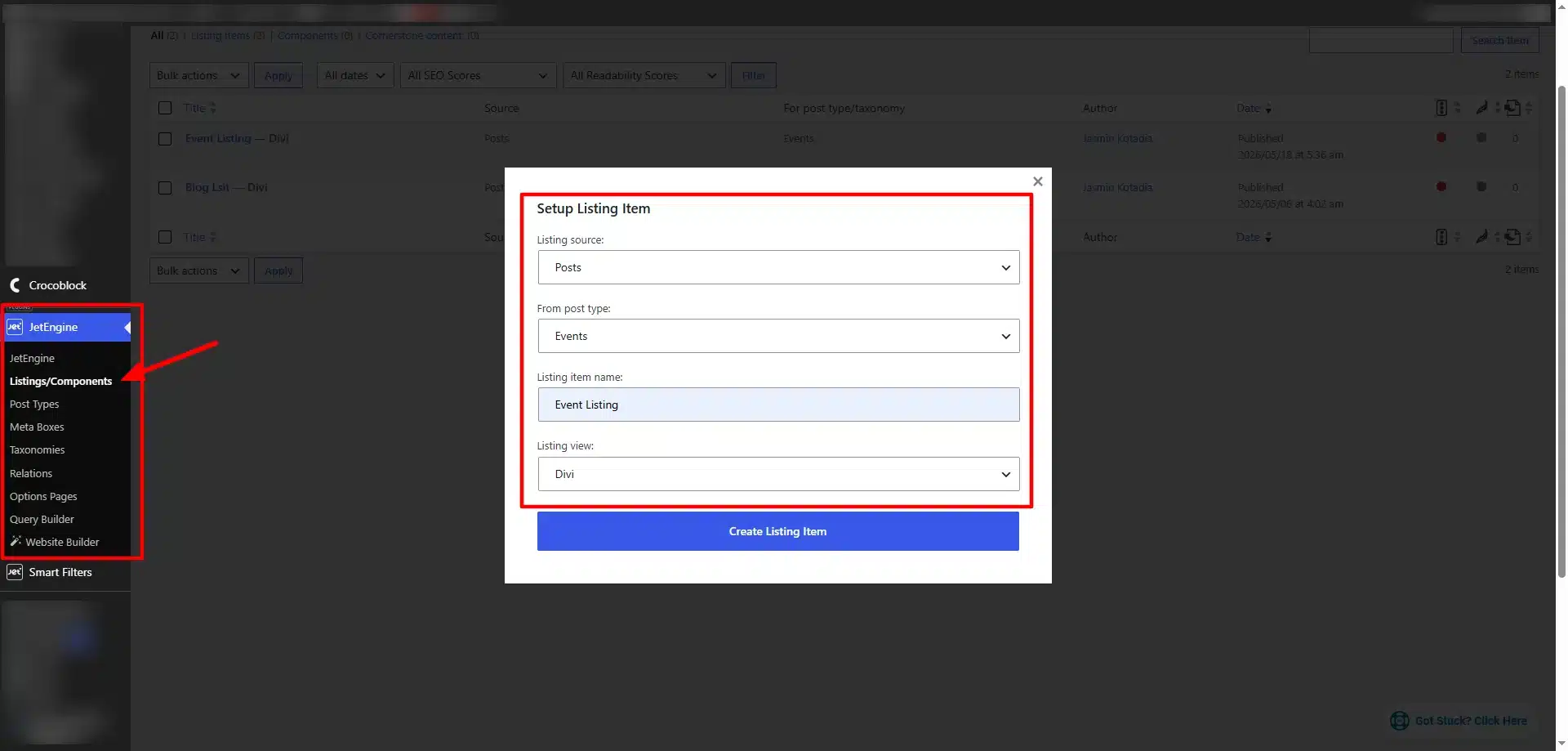
JetEngine → Listings
Create a listing template for your custom post type.
You can display:
- Event Title
- Date
- Featured Image
- Buttons
- Dynamic Fields
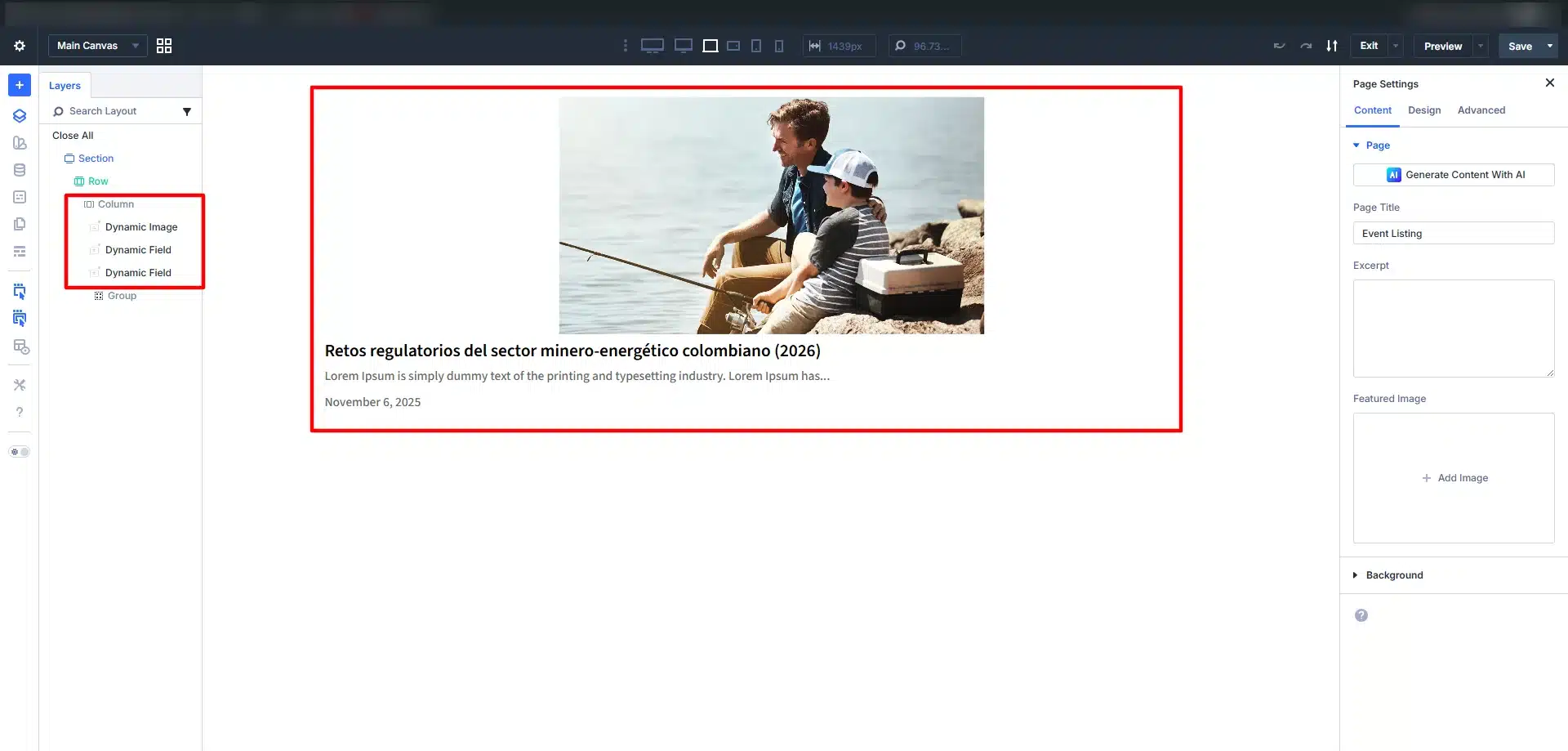
Then save your template.
Step 5: Add Listing Grid in Divi
Open your page with Divi Builder.
Add the JetEngine Listing Grid module.
Select:
- Listing Template
- Query Settings
- Number of Posts
- Pagination
Your dynamic content will now display automatically.
Step 6: Create Date-Based Filters
Now create the actual filters.
Go to:
JetSmartFilters → Add New
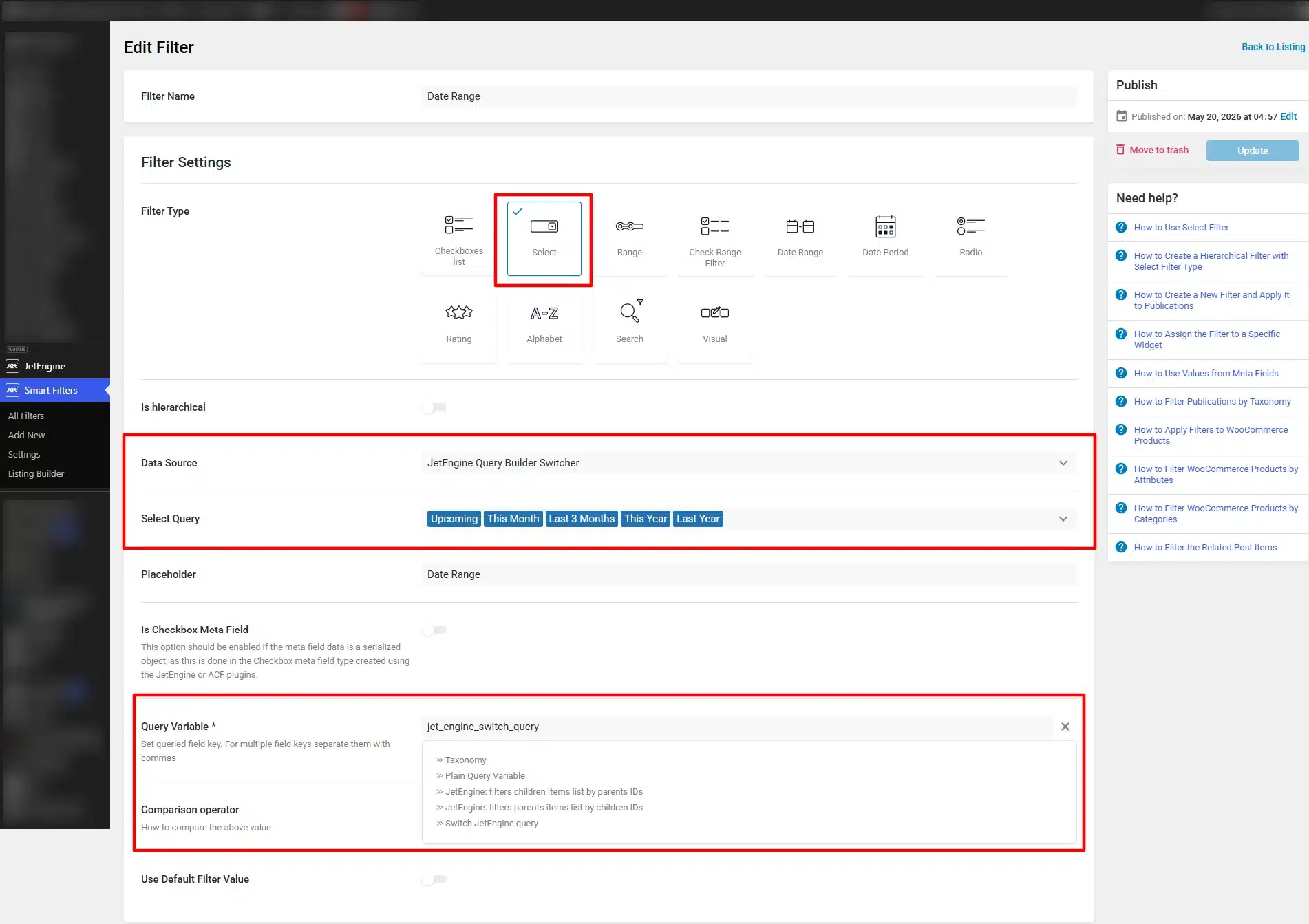
Choose filter type:
Select Filter
Or:
Select Filter
Then configure your filter values.
In Data Source Select JetEngine Query Builder Switcher
Then, in the “Select Query” option, you will need to select the query that was created earlier.
Step 7: Connect Filters With Listing Grid
Now return to Divi Builder.
Add your JetSmartFilters widget above the listing grid.
Configure:
- Provider
- Query ID
- AJAX Settings
- Filter Source
Connect the filter with your listing grid.
Now users can dynamically filter content without page reloads.
Step 8: Customize Filter Design
Using Divi’s visual builder, you can customize:
- Dropdown Styles
- Buttons
- Colors
- Typography
- Spacing
- Responsive Layouts
This helps create a cleaner and more professional frontend experience.
Benefits of Date-Based Filters
Improved User Experience
Visitors can quickly find relevant content.
Faster Navigation
Users filter content instantly using AJAX.
Better Website Organization
Large websites become easier to manage.
Increased Engagement
Relevant content improves visitor interaction.
Professional Dynamic Websites
Create modern filtering systems without custom coding.
Best Use Cases for Date Filters
Date-based filters work perfectly for:
- Event Websites
- Webinar Platforms
- Blog Archives
- News Websites
- Course Websites
- Property Listings
- Booking Platforms
Final Thoughts
Creating date-based filters in Divi using JetSmartFilters is a powerful way to improve content discovery and user experience on dynamic WordPress websites.
With Divi’s visual builder and Crocoblock’s dynamic filtering tools, you can easily create advanced filtering systems for events, blogs, directories, and custom listings without heavy development work.
Whether you’re building an event platform, archive system, or dynamic business website, JetSmartFilters makes date-based filtering simple, flexible, and highly effective.
Need help building advanced filters, dynamic listings, or custom functionality in Divi? The team at Technocrackers specializes in Divi, WordPress, and WooCommerce development to build scalable, high-performing websites. Get a free quote to discuss your project requirements and custom development needs.