




Table of Contents
- What Are Dynamic Listings?
- Why Use Crocoblock With Divi 5?
- Step 1: Install Required Plugins
- Step 2: Create a Custom Post Type
- Step 3: Add Custom Meta Fields
- Step 4: Add Listing Content
- Step 5: Create a Listing Template
- Step 6: Display Listing Grid in Divi 5
- Step 7: Add Advanced Filters With JetSmartFilters
- Step 8: Customize Design and Styling
- Benefits of Dynamic Listings in Divi 5
- Faster Website Management
- Scalable Website Structure
- Better User Experience
- Reduced Manual Work
- Professional Website Design
- Final Thoughts
Building dynamic websites in WordPress has become much easier with the combination of Divi 5 and Crocoblock plugins. If you want to create advanced listing websites such as real estate directories, business listings, event portals, job boards, or custom WooCommerce layouts, Crocoblock’s JetEngine plugin provides everything you need.
In this guide, you’ll learn how to create dynamic listings in Divi 5 using Crocoblock step by step.
What Are Dynamic Listings?
Dynamic listings are content layouts that automatically pull information from custom post types, custom fields, or taxonomies.
Instead of designing every page manually, you create one template and WordPress dynamically displays content for each item.
Examples include:
- Property Listings
- Business Directories
- Team Members
- Events
- Job Listings
- Portfolio Items
- Product Catalogs
Why Use Crocoblock With Divi 5?
Divi offers a powerful visual builder, while JetEngine adds advanced dynamic functionality.
Together, they allow you to:
- Create custom post types
- Add dynamic fields
- Build listing grids
- Create dynamic templates
- Add advanced filters
- Design websites visually without heavy coding
Divi 5 also improves website speed and performance, making dynamic websites smoother and more scalable.
Step 1: Install Required Plugins
Before starting, install the following plugins:
- Divi 5
- JetEngine
- JetSmartFilters (optional)
- Crocoblock DevTools (optional)
Once activated, you’ll be ready to create dynamic content.
Step 2: Create a Custom Post Type
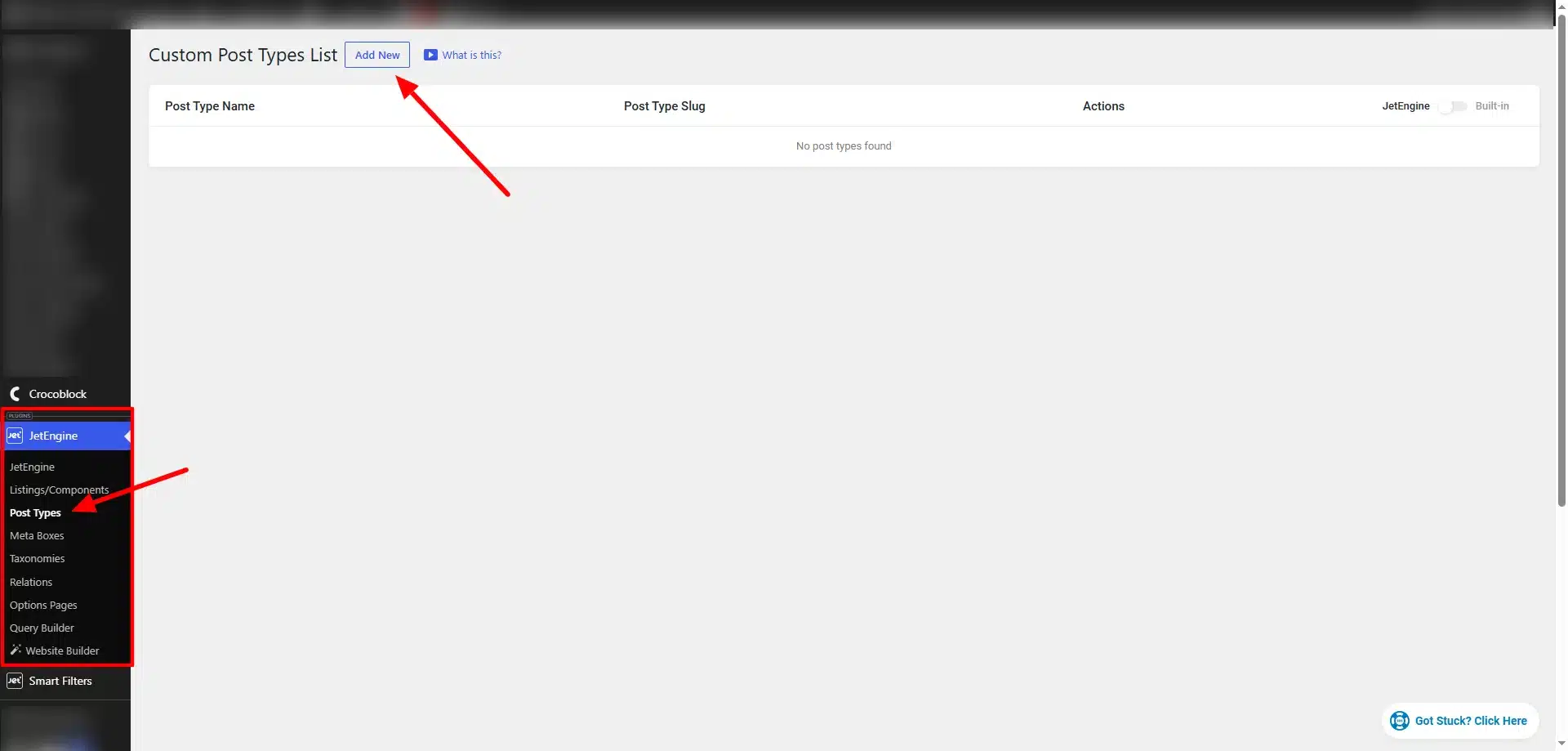
The first step is creating a Custom Post Type (CPT).
Go to:
JetEngine → Post Types
Click:
Add New
Example custom post types:
- Properties
- Cars
- Events
- Jobs
- Restaurants
Add:
- Post type name
- Labels
- Slug
- Icons
Then save the post type.
Step 3: Add Custom Meta Fields
Meta fields store dynamic information for each listing item.
Go to:
JetEngine → Meta Boxes
Create fields like:
- Text
- Number
- Date
- Image
- Select
- Repeater

These fields will appear while editing your custom posts.
Step 4: Add Listing Content
Now add actual content to your custom post type.
Example:
Properties → Add New
Fill in:
- Title
- Featured Image
- Description
- Dynamic Meta Fields
Repeat for multiple listings.
Step 5: Create a Listing Template
Now it’s time to design the layout.
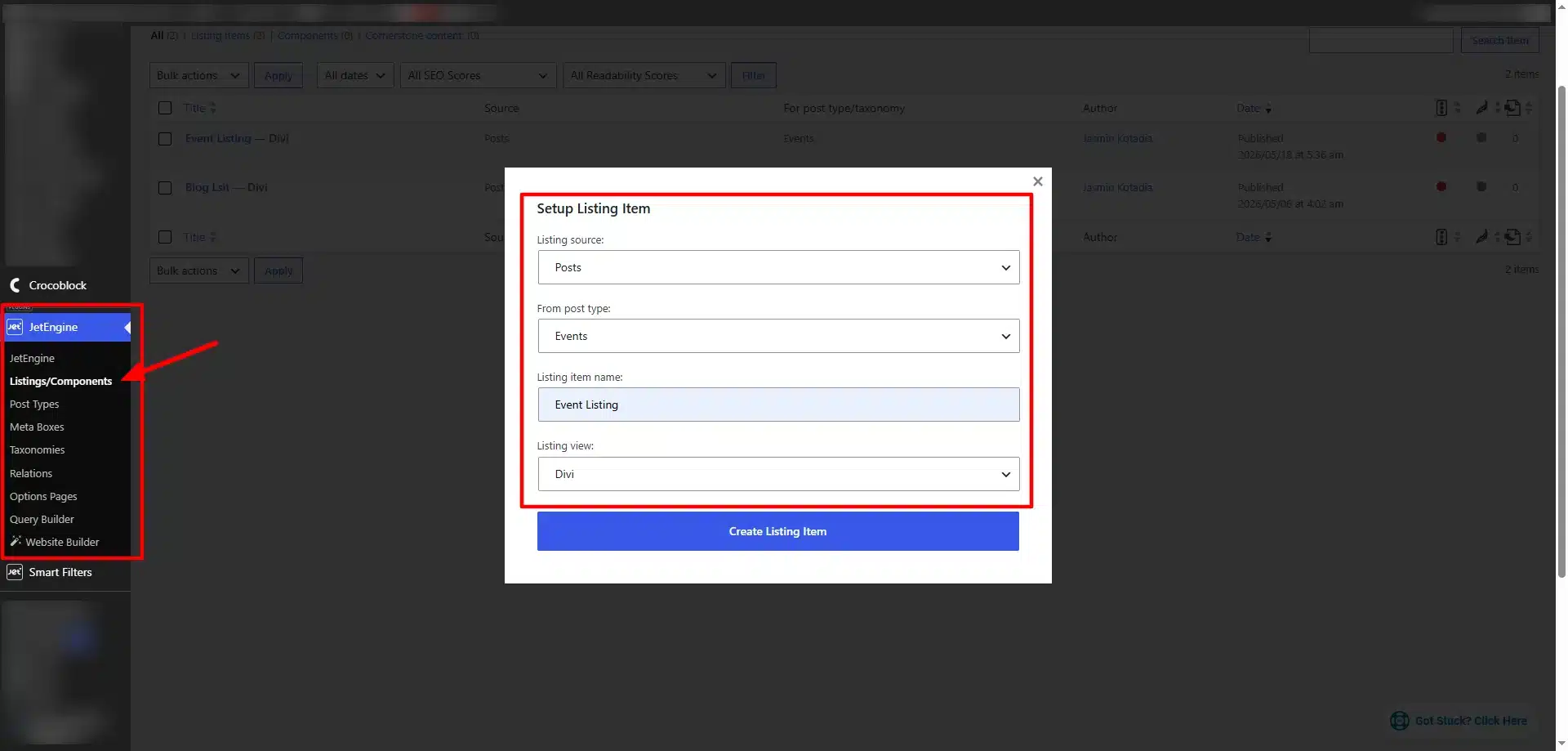
Go to:
JetEngine → Listings
Click:
Add New Listing
Choose:
- Listing Source
- Post Type
- Builder: Divi
Now design your listing card layout.
You can display:
- Dynamic Images
- Dynamic Titles
- Prices
- Locations
- Buttons
- Ratings
- Custom Fields
This template automatically applies to all listing items.
Step 6: Display Listing Grid in Divi 5
Open your page in Divi Builder.
Add the JetEngine Listing Grid module.
Choose your listing template and configure:
- Number of columns
- Posts per page
- Pagination
- Query settings

Your dynamic listings will now display automatically.
Step 7: Add Advanced Filters With JetSmartFilters
To improve user experience, add filters using JetSmartFilters.
You can create filters for:
- Categories
- Price Range
- Date
- Location
- Ratings
- Search Keywords
Filters work with AJAX, meaning results update instantly without page reloads.
This is especially useful for:
- Real Estate Websites
- WooCommerce Stores
- Directory Websites
- Event Platforms
Step 8: Customize Design and Styling
Use Divi 5’s visual builder to customize:
- Colors
- Typography
- Card Layouts
- Hover Effects
- Buttons
- Grid Spacing
- Responsive Design
This gives you complete control over your website’s appearance.
Benefits of Dynamic Listings in Divi 5
Faster Website Management
Update content once and changes apply automatically.
Scalable Website Structure
Easily manage hundreds or thousands of listings.
Better User Experience
Visitors can quickly search and filter content.
Reduced Manual Work
Dynamic templates eliminate repetitive design work.
Professional Website Design
Create modern layouts without custom coding.
Final Thoughts
Creating dynamic listings in Divi 5 using Crocoblock is one of the best ways to build advanced WordPress websites without relying heavily on custom development.
With JetEngine and JetSmartFilters, you can create scalable, interactive, and highly customizable listing websites for almost any industry.
Whether you’re building a directory, marketplace, real estate portal, or dynamic business website, the combination of Divi 5 and Crocoblock provides a flexible and powerful solution for modern WordPress development.
Need help creating dynamic listings, custom post types, or advanced Crocoblock functionality in Divi? Technocrackers helps businesses build smarter, scalable WordPress experiences with Divi and Crocoblock. Get a free quote to discuss your custom development requirements.