





Table of Contents
- What Are Global Presets in Divi 5?
- Why Use Global Presets?
- Step 1: Design Your First Module
- Step 2: Save It as a Global Preset
- Step 3: Apply the Preset Anywhere
- Step 4: Create Multiple Presets
- Step 5: Update Your Presets
- Real-World Example
- Best Practices
- When Should You Use Global Presets?
- Benefits of Divi 5 Global Presets
- Final Thoughts
- Ready to Build Your Next Website?
Managing a growing website can quickly become time-consuming if you have to edit the same styles across dozens of pages. Whether you’re updating button colors, typography, spacing, or module designs, making the same changes repeatedly is inefficient.
That’s where Divi 5 Global Presets come in.
Global Presets allow you to create reusable design styles that can be applied across your entire website. Instead of editing every module individually, you simply update the preset once, and every module using that preset can be updated in just a few clicks.
In this guide, we’ll show you how to create and use Global Presets in Divi 5 to build websites faster, maintain design consistency, and simplify future updates.
What Are Global Presets in Divi 5?
Global Presets are reusable style templates for Divi modules.
Rather than designing every Heading, Button, Image, Blurb, or Call To Action module from scratch, you can save a preset containing your preferred styles and reuse it throughout your website.
A Global Preset can include:
- Colors
- Typography
- Font sizes
- Borders
- Shadows
- Spacing
- Alignment
- Animations
- Module-specific settings
Once created, these presets can be applied to any compatible Divi module with just one click.
Why Use Global Presets?
If you’re still styling each module individually, you’re spending more time than necessary.
Global Presets help you:
- Maintain consistent branding across every page.
- Reduce repetitive design work.
- Speed up website development.
- Simplify future design updates.
- Minimize styling mistakes.
- Make websites easier for clients to manage.
Whether you’re building a small business website or a large WooCommerce store, Global Presets save valuable development time.
Step 1: Design Your First Module
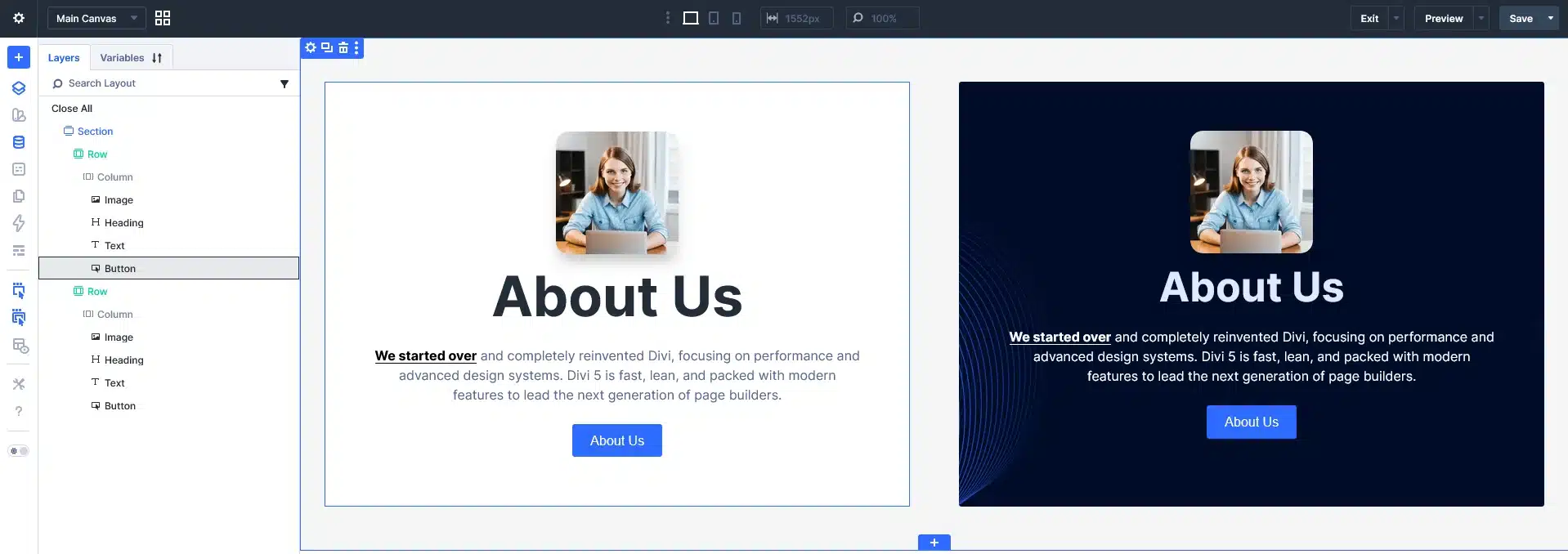
Start by adding the module you want to reuse throughout your website.
For example:
- Button
- Heading
- Text
- Image
- Blurb
- Call To Action
- Icon
- Testimonial
Customize every design setting exactly how you want it.
Example:
- Brand colors
- Border radius
- Padding
- Typography
- Hover effects
- Shadows
Think of this as creating your master design.
Step 2: Save It as a Global Preset
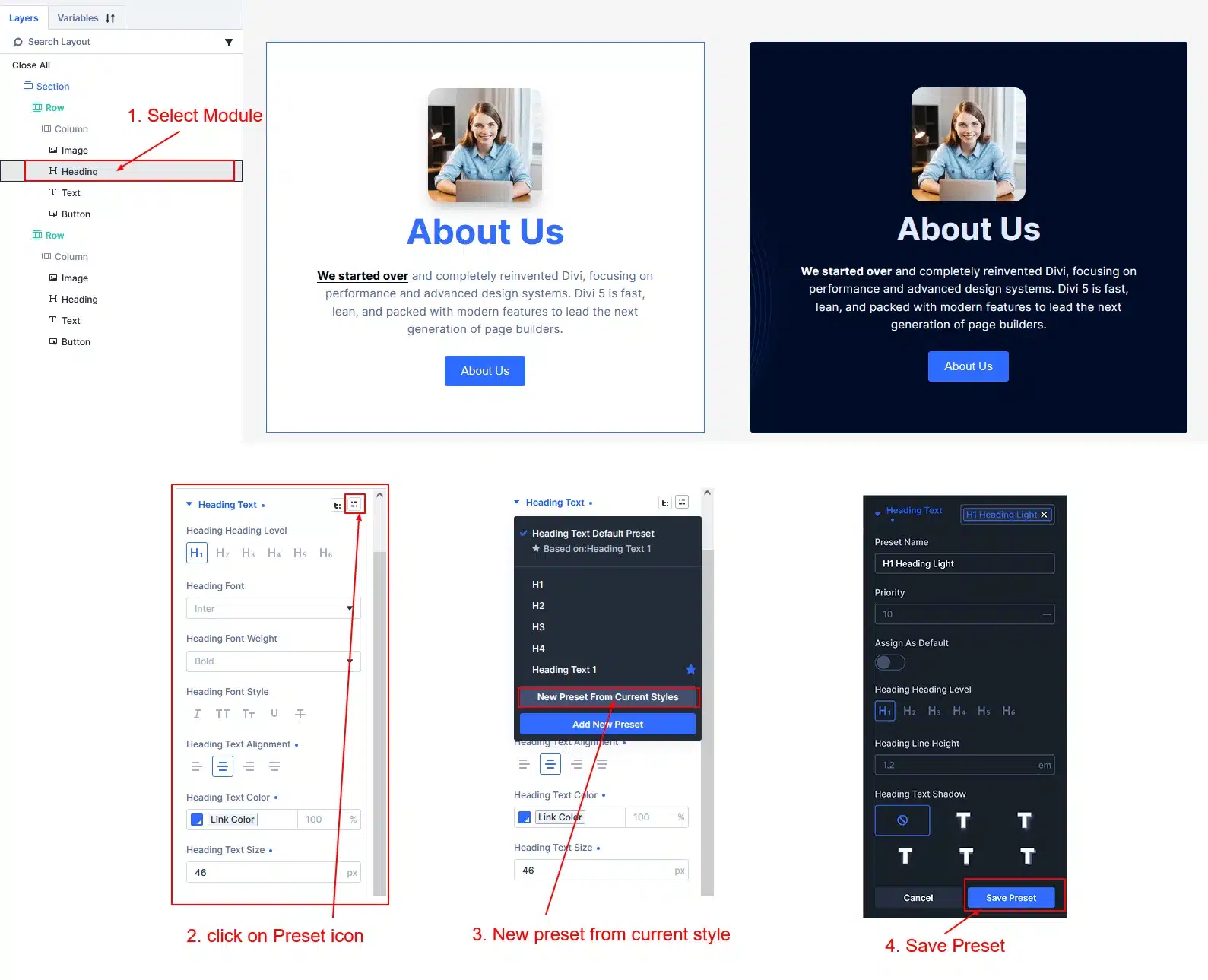
Once your module looks perfect:
- Open the module settings.
- Click the Preset selector at the top.
- Choose Create New Preset.
- Give it a meaningful name.
Examples:
- H1 Heading Light
- H1 Heading Dark
- H2 Heading Light
- H2 Heading Dark
- Primary Button
- Secondary Button
- Dark CTA
- Section Heading
- Product Card
- Testimonial Card
Save the preset.
Your design is now available anywhere on the website.
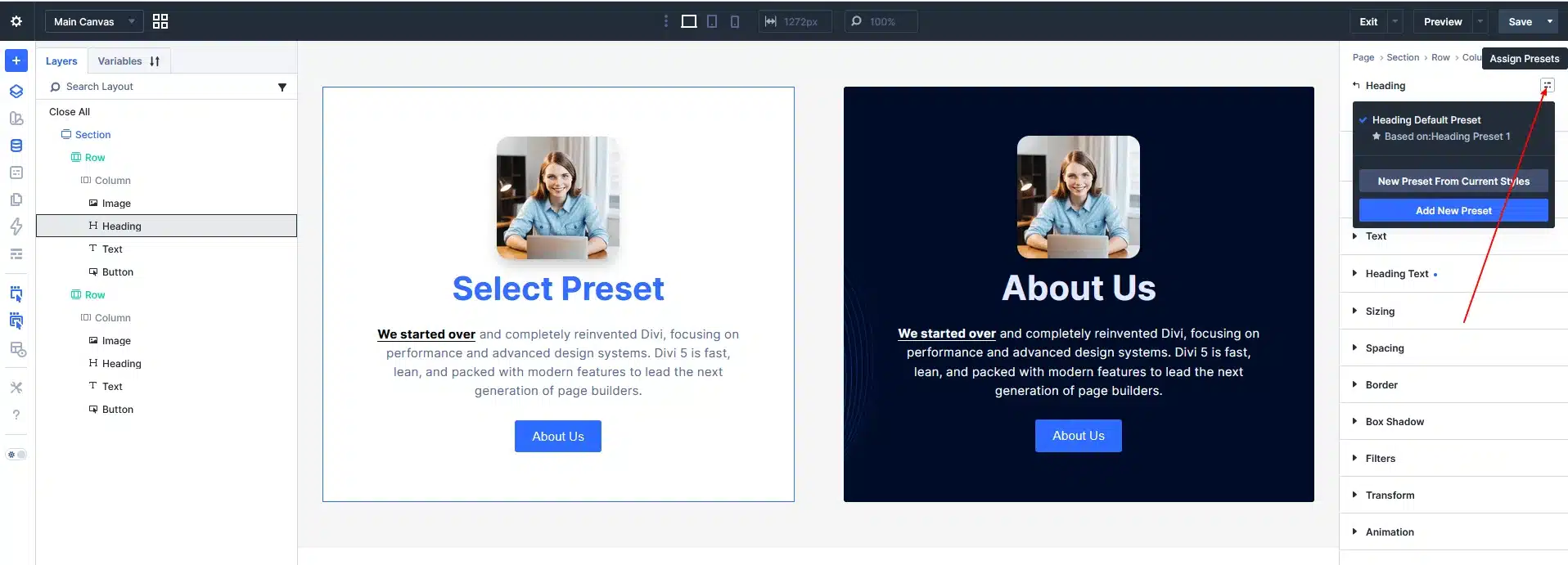
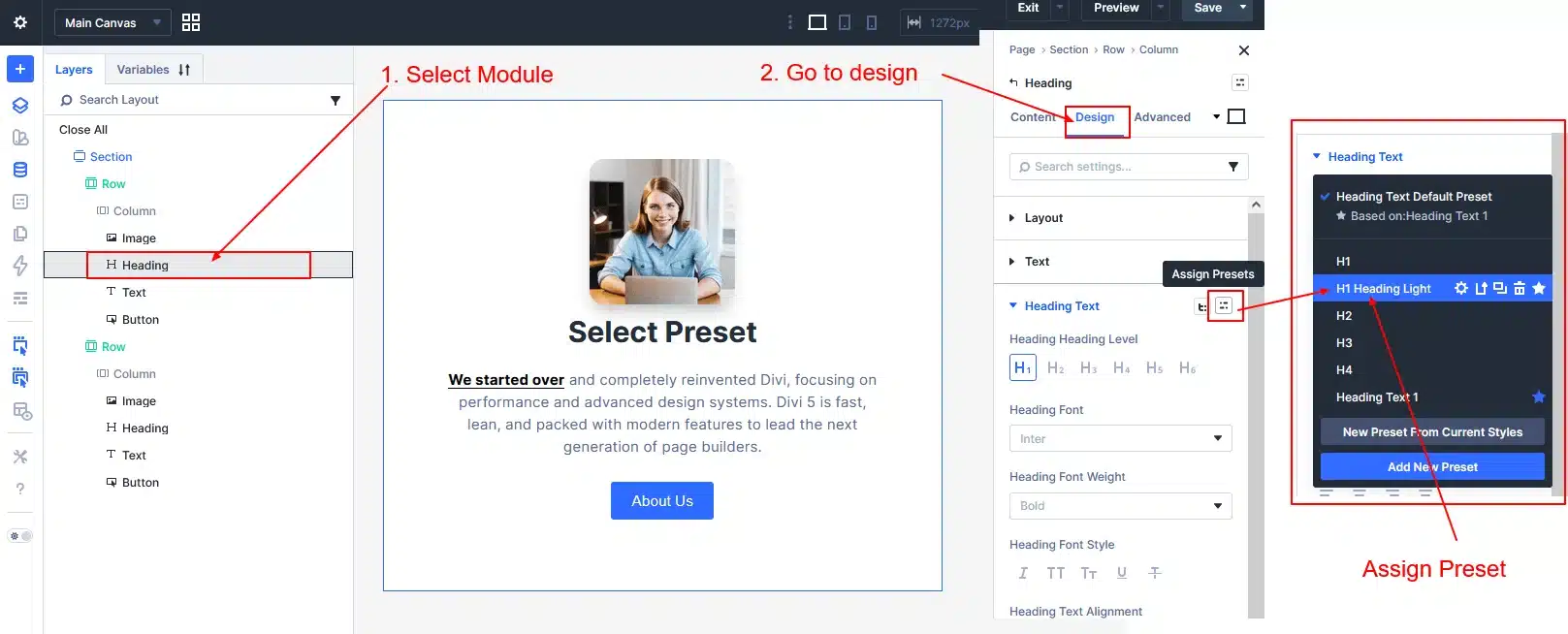
Tip: If you already have another module with the exact design you want to reuse, you don’t need to create a new preset from scratch. Simply click the Assign Presets icon and select New Preset From Current Styles. Divi 5 will automatically save all of the module’s existing styles—including typography, spacing, colors, borders, shadows, and other design settings—into a reusable preset that you can apply to any similar module across your website.
Step 3: Apply the Preset Anywhere
Whenever you add the same module elsewhere:
- Open the module settings.
- Select the Preset dropdown.
- Choose your saved preset.
Instantly, the module inherits all your predefined styles.
No copying.
No rebuilding.
No repeated styling.
Step 4: Create Multiple Presets
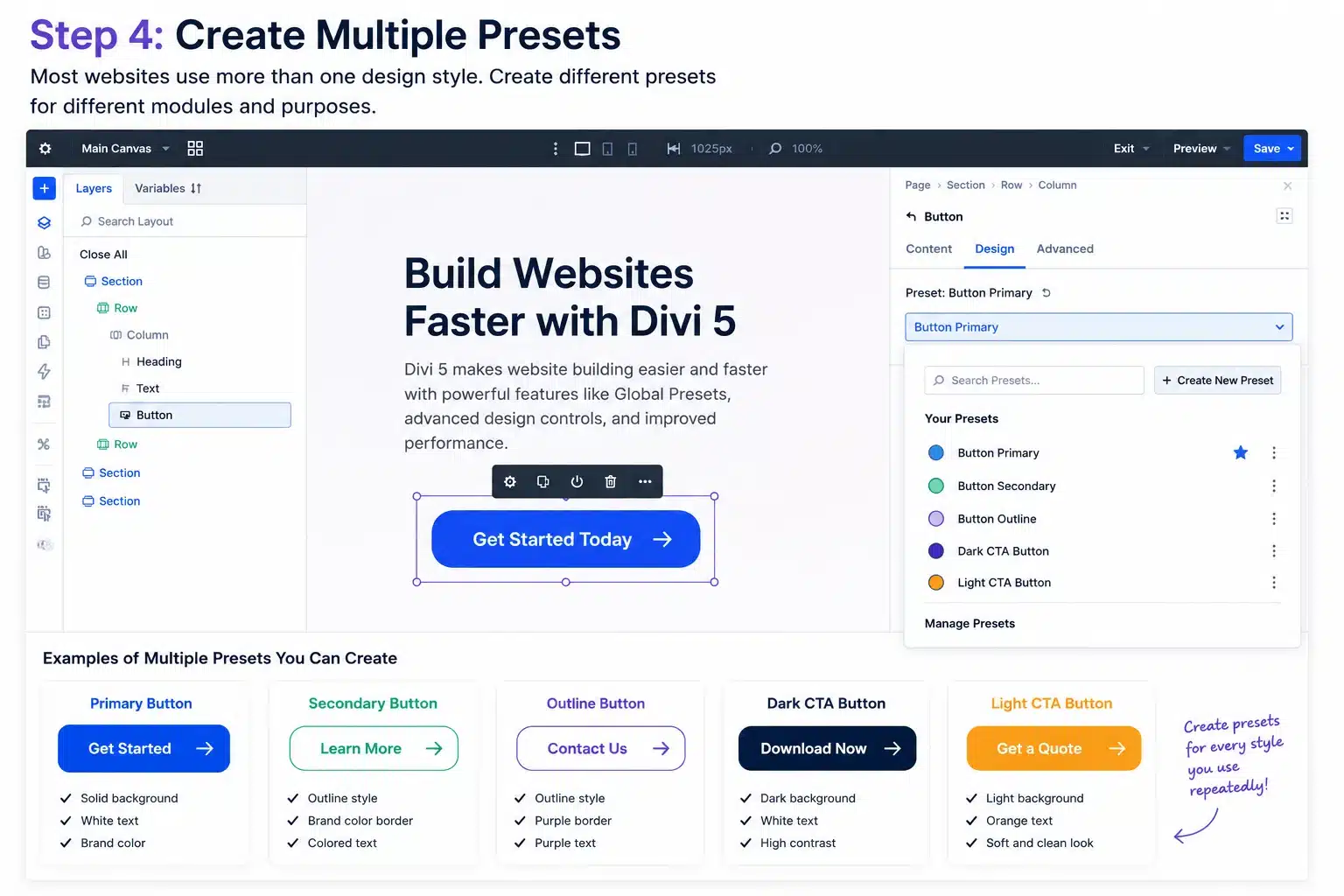
Most websites use more than one design style.
Create different presets for different purposes.
Examples include:
Buttons
- Primary Button
- Secondary Button
- Outline Button
Headings
- Hero Heading
- Section Heading
- Sidebar Heading
Images
- Rounded Images
- Shadow Images
- Team Photos
Call To Actions
- Light CTA
- Dark CTA
- Promotional CTA
Creating multiple presets keeps your design system organized and scalable.
Step 5: Update Your Presets
One of the biggest advantages of Global Presets is easy maintenance.
Suppose your client changes their brand color.
Instead of editing hundreds of buttons:
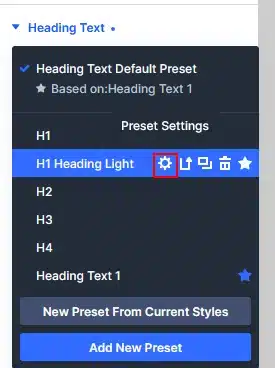
- Edit the Global Preset.
- Update the color.
- Save.
Every module using that preset can then be updated consistently across the website, eliminating repetitive manual edits.
This is especially valuable when managing websites with dozens or even hundreds of pages.
Real-World Example
Imagine you’re building a website with:
- 120 pages
- 350 buttons
- 90 Call To Action sections
- 200 headings
Without Global Presets:
Every design update requires editing each module individually.
With Global Presets:
Update one preset and reuse that design everywhere it’s applied, dramatically reducing maintenance time and keeping your branding consistent.
Best Practices
To get the most from Divi 5 Global Presets:
- Use clear preset names.
- Create presets before building multiple pages.
- Keep branding consistent across all modules.
- Avoid creating unnecessary duplicate presets.
- Review your presets regularly to remove unused styles.
Build a reusable design system that your entire team can follow.
When Should You Use Global Presets?
Global Presets are especially useful for:
- Business websites
- Agency websites
- WooCommerce stores
- Membership websites
- Portfolio websites
- Landing pages
- Multi-page corporate websites
If a design is used more than once, it’s a good candidate for a Global Preset.
Benefits of Divi 5 Global Presets
Using Global Presets can help you:
- Save hours of repetitive work.
- Build websites faster.
- Maintain consistent branding.
- Reduce design errors.
- Simplify client handoffs.
- Make future redesigns much easier.
- Improve long-term website maintenance.
For agencies and freelancers managing multiple websites, Global Presets become one of the most valuable features in Divi 5.
Final Thoughts
Divi 5 Global Presets are more than just a time-saving feature—they’re the foundation of a scalable and consistent design workflow.
Instead of rebuilding the same styles over and over, you can create reusable presets once and apply them across your entire website. As your project grows, updates become faster, cleaner, and much easier to manage.
If you’re building websites with Divi 5, investing a little time in setting up Global Presets will pay off throughout the life of every project.
Start creating your presets today, and you’ll spend less time editing modules and more time building exceptional websites.
Ready to Build Your Next Website?
From custom WordPress development and Divi 5 websites to WooCommerce stores and website optimization, Technocrackers helps businesses create fast, secure, and scalable websites that deliver results.
Contact us today for a free consultation
let’s bring your vision to life.