Table of Contents
When working on a WordPress website—whether you’re a developer, content creator, or agency—it’s common to share draft pages or posts with clients before publishing.
However, by default, WordPress requires users to be logged in to view draft content. This can be inconvenient when you simply want to share a preview link with a client or team member who doesn’t have WordPress access.
Most people install plugins to do this, but you can generate secure, shareable preview links without any plugin using a small custom code snippet.
In this guide, you’ll learn how to:
- Allow non-logged-in users to view draft previews
- Generate a shareable URL for any post type
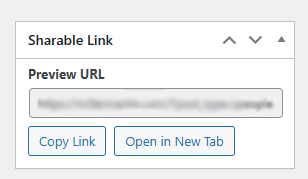
- Automatically display a “Sharable Link” meta box in the WordPress editor
- Add one-click buttons to copy or open the preview link
- Support posts, pages, and unlimited custom post types (CPTs)
Why Do You Need Shareable Draft Links?
Here are common scenarios where this is extremely useful:
- Sending preview links to clients
- Allowing team members to review draft content
- Sharing landing pages or funnels under development
- Getting approval on blog posts, pages, or custom post types
- Avoiding unnecessary WordPress accounts or login steps
How the Solution Works
We will:
- Add a URL parameter key=guest
- Modify the main query to allow draft preview when this key is present
- Add a meta box that generates the shareable link
- Automatically show the live URL for published posts
- Allow preview URL for draft/unpublished posts
- Add “Copy Link” and “Open Link” buttons
Full Code: Shareable Preview Link Generator
Place this code in your child theme’s functions.php File.
Code Snippet:
add_action('pre_get_posts', 'allow_draft_preview');
function allow_draft_preview($query) {
    if (isset($_GET['key']) && $_GET['key'] == 'guest') {
        if ($query->is_main_query()) {
            $query->set('post_status', array('publish', 'draft'));
        }
    }
}
add_action('add_meta_boxes', function () {
// Define your target post types
$custom_post_types = ['post', 'page', 'people', 'locations', 'practiceareas', 'alerts', 'blog', 'events', 'news', 'publications', 'video', 'open-positions'];
foreach ($custom_post_types as $post_type) {
        if (post_type_exists($post_type)) {
            add_meta_box(
                'sharable_link_box',
                'Sharable Link',
                'render_sharable_link_box',
                $post_type,
                'side',
                'high'
            );
       }
    }
}, 20); // Priority 20 ensures CPTs are registered

function render_sharable_link_box($post) {
    $is_published = $post->post_status === 'publish';
    if ( $is_published ) {
        $url = esc_url( get_permalink( $post->ID ) );
        $label = 'Live URL';
    } else {
        $preview_url = get_preview_post_link( $post->ID );
        $url = esc_url( add_query_arg( 'key', 'guest', $preview_url ) );
        $label = 'Preview URL';
    }
    echo '<label style="font-weight: bold; display: block; margin-bottom: 5px;">' . esc_html( $label ) . '</label>';
    echo '<input type="text" readonly value="' . $url . '" style="width:100%; font-size:12px;" id="sharableLinkURL">';
    echo '<div style="margin-top:8px; display:flex; gap:8px; flex-wrap:wrap;">';
    echo '<button type="button" class="button" onclick="copySharableURL()">Copy Link</button>';
    echo '<button type="button" class="button button-secondary" onclick="openSharableURL()">Open in New Tab</button>';
    echo '</div>';

// JS for buttons
echo <<<HTML
<script>
function copySharableURL() {
    const input = document.getElementById('sharableLinkURL');
    input.select();
    input.setSelectionRange(0, 99999); // For mobile
    document.execCommand('copy');
    alert('URL copied to clipboard!');
}
function openSharableURL() {
    const input = document.getElementById('sharableLinkURL');
    const url = input.value;
    window.open(url, '_blank');
}
</script>
HTML;
}
How to Use the Shareable Link
Once the code is active:
1. Edit any post, page, or CPT
You’ll see a new meta box on the right side labeled “Sharable Link”.
2. For published posts
It shows the Live URL.
3. For draft or pending posts
It shows a secure preview URL like:
https://yoursite.com/?p=123&preview=true&key=guest
4. Share it with your client
They do not need to log in.
5. Use the built-in buttons
- Copy Link → copies URL to clipboard
- Open in New Tab → loads preview instantly

Conclusion
With just a few lines of code, you can easily generate shareable preview links for any WordPress post type—without plugins.
If you’re building a WordPress site that requires custom workflows, advanced CMS logic, or plugin-free solutions, our team can take complete ownership of the project—from planning and development to testing and launch.
You can Book a Free Project Consultation to discuss your requirements, timelines, and how we can deliver the entire solution for you.