




Table of Contents
- What You Get With JetEngine in Divi 5
- 1. Custom Post Types (CPTs) and Taxonomies
- 2. Flexible Custom Meta Fields
- 3. Dynamic Listing Templates (Loops)
- 4. Post Type Relationships
- 5. Visual Query Builder
- 6. Custom Content Types (CCT) & Performance Boosts
- 7. REST API & Data Stores
- Interactive UI: What JetSmartFilters Adds to Divi 5
- How to Get Started (Installation Guide)
- Final Takeaway
Divi has always been a powerhouse when it comes to visual design. Its seamless layout controls, global element system, and styling flexibility make it a favorite for designers globally. However, when a project demands advanced data structures—like custom post types, complex relationships, or robust AJAX filtering—designers often have to look for complex workarounds or switch page builders entirely.
Crocoblock has officially announced that JetEngine and JetSmartFilters are now fully compatible with Divi 5! This major update brings a massive wave of dynamic functionality into the Divi 5 Builder ecosystem, allowing you to build data-heavy, highly interactive websites without writing a single line of code.
Let’s dive deep into what this integration means for your workflow and your WordPress websites.
What You Get With JetEngine in Divi 5
JetEngine is the core engine of the Crocoblock ecosystem, providing the architecture needed to transition Divi from a static page builder to a full dynamic rendering system.
1. Custom Post Types (CPTs) and Taxonomies
Whether you are building a real estate platform, a service directory, or a team portfolio, you can create dedicated custom post types. Custom taxonomies let you group and classify your content seamlessly, keeping your backend perfectly organized.
2. Flexible Custom Meta Fields
Stop cramming raw data into the standard content editor. JetEngine allows you to append custom meta fields—such as text, numbers, dates, media galleries, switches, and repeaters—directly to your content types and effortlessly pull them onto the front-end using Divi 5.
3. Dynamic Listing Templates (Loops)
You can now build a single listing item layout (a loop template) using Divi, and instruct JetEngine to repeat it across a grid or a slider. Design it once, and let your custom data populate the rest automatically.
4. Post Type Relationships
Need to link doctors to specific clinics, or real estate agents to properties? JetEngine supports multi-level, complex content relationships so you can seamlessly cross-reference your site’s data.
5. Visual Query Builder
Tell your website exactly what content to show without touching PHP or SQL. The visual Query Builder lets you query posts, users, or taxonomies, set strict conditions, and reuse those specific rules across your site templates.
6. Custom Content Types (CCT) & Performance Boosts
For massive data projects that don’t need dedicated individual front-end pages (like user submissions or logs), Custom Content Types store data in dedicated database tables. This greatly minimizes database bloat and speeds up loading times.
7. REST API & Data Stores
Connect external CRMs or pull data across multiple websites natively. Additionally, you can implement user-centric features like bookmarks, favorited items, or wishlists using the Data Stores module.
Interactive UI: What JetSmartFilters Adds to Divi 5
Great content structure is only half the battle; users also need a seamless way to navigate it. JetSmartFilters adds a lightning-fast interactive layer to your Divi 5 websites.
- Advanced AJAX Filtering: Allow your users to slice and dice information by taxonomies, meta fields, date/numeric ranges, or text keywords. Because it uses AJAX, content refreshes instantly without reloading the page.
- Combined/Stacked Filters: Users can narrow down criteria precisely—for example, filtering houses by city, then by price range, and finally by the number of bedrooms all at the same time.
How to Get Started (Installation Guide)
Crocoblock’s engineering team built a dedicated extension to ensure optimal speed and compatibility rather than overloading the core plugins.
To bring this powerhouse combo to your site, simply follow these steps:
- Make sure you are running Divi 5.
- Install and activate the JetEngine and JetSmartFilters
- Install and activate the Crocoblock Divi Integration Addon (available to existing Crocoblock package users).
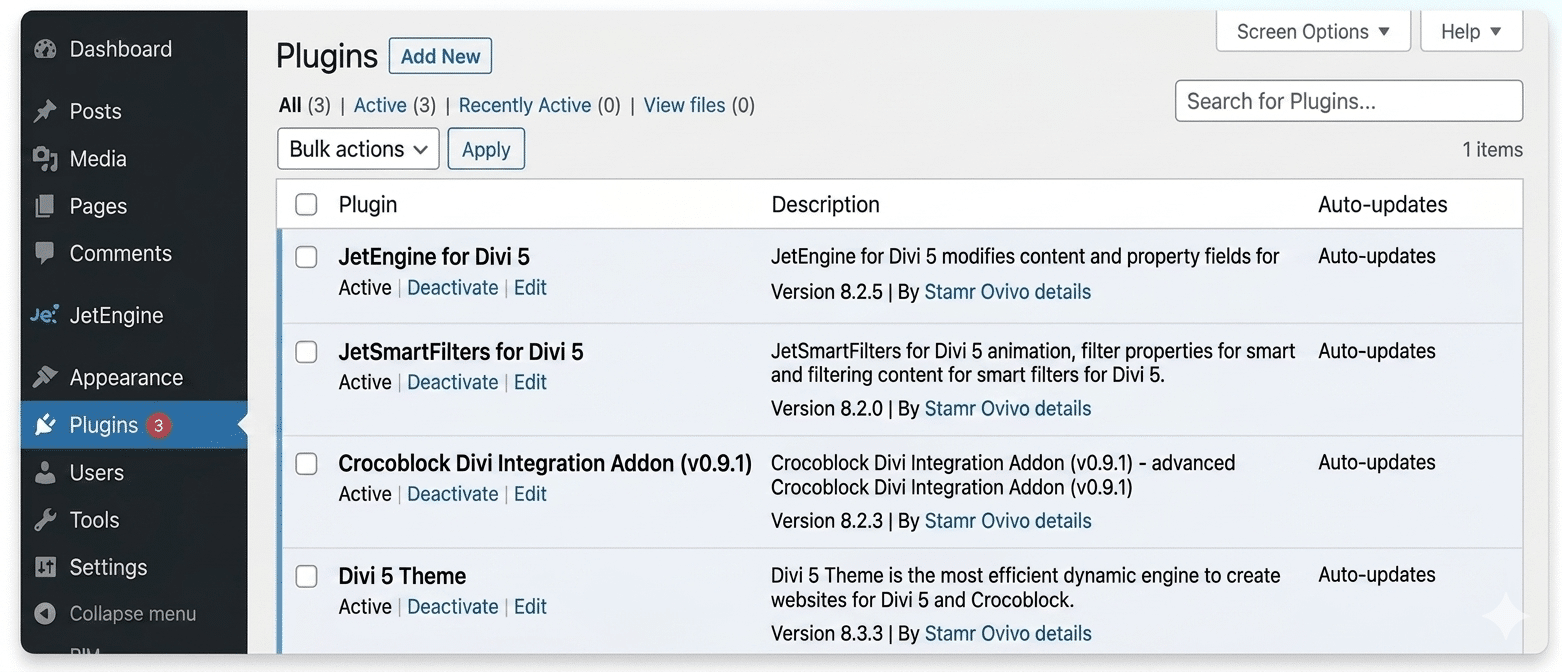
Once active, all dynamic modules and filtering tools will seamlessly integrate directly into your Divi 5 visual builder canvas!
Final Takeaway
If you are just building standard, static landing pages, Divi 5’s core tools are great. But if you want to scale your business by building robust directory portals, e-commerce stores, membership systems, or data-driven layouts, this integration is a game-changer.
JetEngine designs the backend data architecture, JetSmartFilters makes navigating that data effortless, and Divi 5 gives you total visual control over the design.
Want to make the most of Divi 5 with Crocoblock, JetEngine, and JetSmartFilters? Technocrackers helps businesses implement advanced WordPress functionality, dynamic content, and custom Divi solutions. Get a free quote to discuss your website requirements.