WooCommerce is powerful out of the box, but most real-world stores need custom product data beyond price, title, and description. This is where Advanced Custom Fields (ACF) becomes essential. ACF allows store owners and developers to add custom fields like material, dimensions, warranty, brand details, delivery time, or any unique product attribute.
However, adding ACF fields to products is only half the job. The real challenge is displaying those ACF values on the WooCommerce Shop, Category, and Archive pages, not just on the single product page.
In this blog, you’ll learn multiple methods to display ACF product fields on the WooCommerce shop page, including code-based and builder-based approaches, best practices, and performance tips.
Why Display ACF Fields on the Shop Page?
Displaying ACF values on the shop page improves:
- User experience – Customers see important product details before clicking.
- Conversion rate – Less friction, faster decisions.
- Product comparison – Shoppers can compare attributes easily.
- SEO value – Structured product data improves relevance.
Common Use Cases
- Show Brand Name
- Display Product Material
- Add Delivery Time
- Show Custom Badges (Eco-friendly, Handmade, Limited Stock)
- Display Warranty Period
- Show Dimensions or Weight
Prerequisites
Before proceeding, make sure you have:
- WooCommerce installed and activated
- Advanced Custom Fields (Free or Pro)
- ACF field group assigned to Product post type
- Basic knowledge of WordPress hooks (for code method)
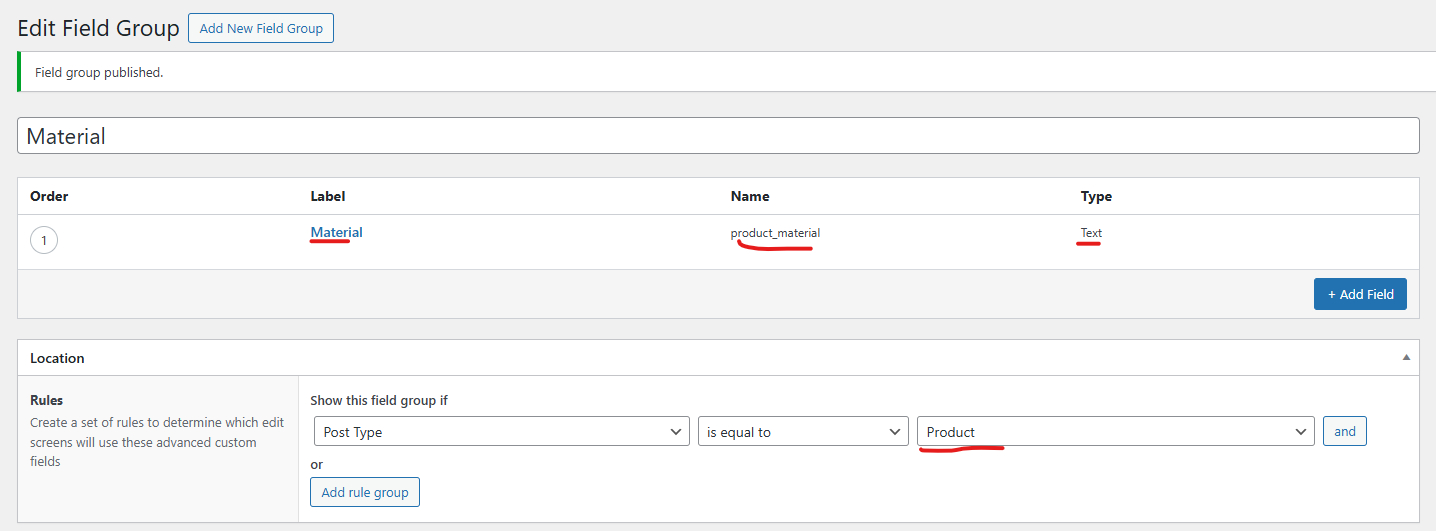
Step 1: Create Custom Fields Using ACF
- Go to ACF → Field Groups
- Click Add New
- Add fields like:
- Field Label: Material
- Field Name: product_material
- Field Type: Text
- Set Location Rule:
- Post Type → is equal to → Product
- Publish the field group
- Add values to products
Method 1: Display ACF Values Using WooCommerce Hooks (Recommended for Developers)
WooCommerce provides powerful hooks that allow you to inject content anywhere on the shop page.
Example: Display ACF Field Below Product Title
add_action( 'woocommerce_after_shop_loop_item_title', 'display_acf_on_shop_page', 15 );
function display_acf_on_shop_page() {
    global $product;
    $material = get_field( 'product_material', $product->get_id() );
    if ( $material ) {
        echo '<p class="product-material">Material: ' . esc_html( $material ) . '</p>';
    }
}
Hook Position Options
| Hook Name | Position |
| woocommerce_before_shop_loop_item_title | Before image |
| woocommerce_after_shop_loop_item_title | Below title |
| woocommerce_after_shop_loop_item | Bottom of product |
| woocommerce_before_shop_loop_item | Wrapper start |
Method 2: Display Multiple ACF Fields Together
add_action( 'woocommerce_after_shop_loop_item_title', 'display_multiple_acf_fields', 20 );
function display_multiple_acf_fields() {
    global $product;
    $brand   = get_field( 'brand_name', $product->get_id() );
    $warranty = get_field( 'warranty_period', $product->get_id() );
   if ( $brand || $warranty ) {
        echo '<div class="custom-product-meta">';
        if ( $brand ) {
            echo '<span class="brand">Brand: ' . esc_html( $brand ) . '</span>';
        }
        if ( $warranty ) {

            echo '<span class="warranty">Warranty: ' . esc_html( $warranty ) . '</span>';
        }
        echo '</div>';
    }
}
Method 3: Display ACF Fields Using Elementor / Divi / Gutenberg
Elementor
- Use Elementor Pro → Woo Product Grid
- Add Dynamic Field
- Select ACF Field
- Choose field name
Divi
- Use Divi Machine / Divi Dynamic Content
- Select ACF Field as dynamic source
Gutenberg (Block Editor)
- Use ACF Blocks
- Or use custom shortcode with do_shortcode()
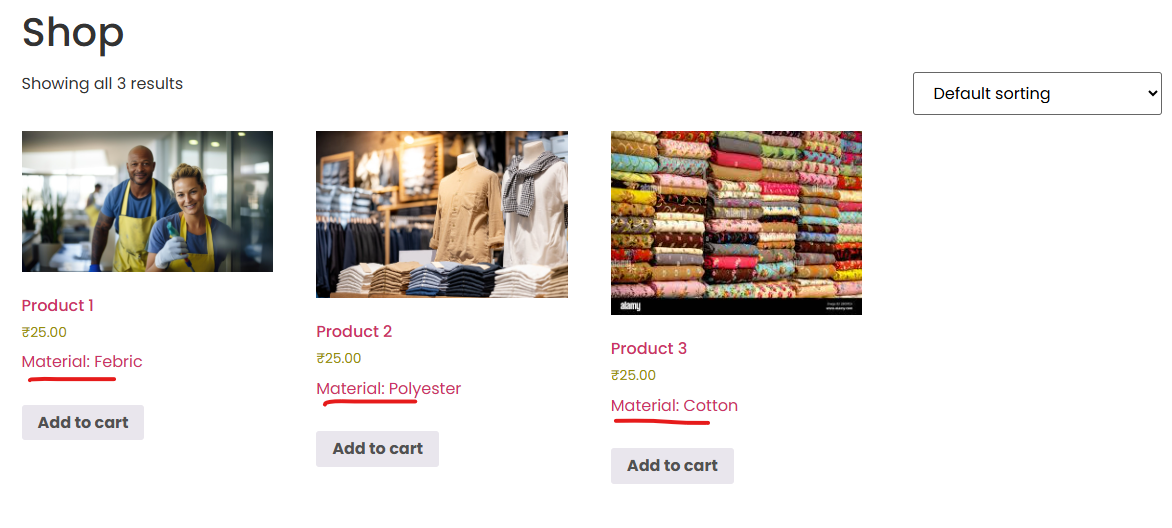
After applying the code, the ACF product values will appear on the WooCommerce shop page output.
Conclusion
Displaying ACF values on the WooCommerce shop page is one of the most effective ways to enhance your product listings and improve user experience. Whether you prefer custom PHP hooks, page builders, or dynamic content tools, WooCommerce and ACF provide flexible solutions for every use case.
For developers, WooCommerce hooks offer maximum control and performance. For non-developers, Elementor, Divi Machine, and dynamic blocks make the process effortless.
If you’re building a custom WooCommerce store, leveraging ACF on shop pages can significantly boost usability and conversions.
Want a custom WordPress solution to display ACF values and improve your WooCommerce shop? Let TechnoCrackers handle your entire WordPress development — from custom features to full site builds, contact us today.