





Table of Contents
- Why Customize Your WooCommerce Cart Page?
- Why Divi 5 is Perfect for WooCommerce Stores
- Step 1: Create a WooCommerce Cart Template
- Step 2: Build the Cart Page Structure
- Step 3: Style the Cart Products Area
- Step 4: Design a High-Converting Cart Summary Sidebar
- Step 5: Build Customer Trust
- Step 6: Add Product Recommendations
- Step 7: Optimize the Cart Page for Mobile Devices
- Best Practices for WooCommerce Cart Pages
- Final Thoughts
- Need Help Building a Custom WooCommerce Store?
A well-designed cart page can significantly impact your WooCommerce store’s conversion rate. While WooCommerce provides a functional default cart page, it often lacks the flexibility needed to match your brand, improve user experience, and guide customers smoothly toward checkout.
With Divi 5, creating a custom WooCommerce cart page is easier than ever. Thanks to Divi’s native WooCommerce modules and visual builder, you can build a fully customized cart experience without writing custom code.
In this guide, we’ll walk through the process of creating a professional WooCommerce cart page in Divi 5 and explore the key features that make customization simple.
Why Customize Your WooCommerce Cart Page?
The cart page is one of the most important steps in the customer’s buying journey. By the time a shopper reaches the cart, they’ve already shown interest in purchasing your products. Your goal is to remove friction and encourage them to complete their order.
A custom cart page allows you to:
- Match your website branding
- Improve customer trust
- Highlight important information
- Simplify the checkout process
- Reduce cart abandonment
- Increase average order value through product recommendations
Rather than relying on WooCommerce’s default layout, Divi 5 gives you complete design freedom.
Why Divi 5 is Perfect for WooCommerce Stores
Divi 5 introduces powerful WooCommerce-focused modules that allow store owners to visually design cart and checkout pages.
Some of the most useful features include:
WooCommerce Modules
Divi 5 includes dedicated modules such as:
- Woo Cart Products
- Woo Cart Totals
- Woo Cross Sells
- Woo Checkout Billing
- Woo Checkout Shipping
- Woo Checkout Payment
These modules automatically pull WooCommerce data while allowing complete design customization.
Design Variables
Maintain consistent colors, spacing, typography, and sizing across your WooCommerce store.
Presets
Save and reuse design styles for buttons, cards, headings, and other elements.
Responsive Controls
Fine-tune your cart page across desktop, tablet, and mobile devices without additional plugins.
WooCommerce Modules Available in Divi 5
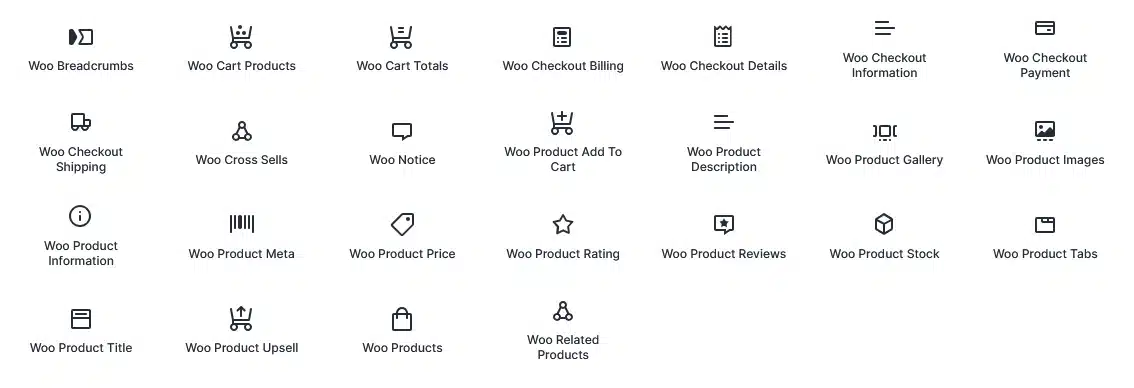
One of the biggest advantages of Divi 5 is its extensive collection of native WooCommerce modules. These modules allow you to visually build and customize every part of your online store without relying on custom code.
For cart and checkout pages, Divi 5 provides modules such as:
- Woo Cart Products
- Woo Cart Totals
- Woo Cross Sells
- Woo Notice
- Woo Checkout Billing
- Woo Checkout Shipping
- Woo Checkout Information
- Woo Checkout Details
- Woo Checkout Payment
For product pages, you can also use:
- Woo Product Title
- Woo Product Images
- Woo Product Gallery
- Woo Product Price
- Woo Product Description
- Woo Product Rating
- Woo Product Reviews
- Woo Product Stock
- Woo Product Meta
- Woo Product Tabs
- Woo Related Products
- Woo Product Upsell
- Woo Product Add To Cart
These dedicated modules make it possible to create fully customized WooCommerce product, cart, and checkout experiences directly within the Divi 5 Visual Builder.
Example: For our custom cart page, we primarily used the Woo Cart Products, Woo Cart Totals, Woo Notice, and Woo Cross Sells/Loop Builder modules to create a clean, conversion-focused shopping experience.
Step 1: Create a WooCommerce Cart Template
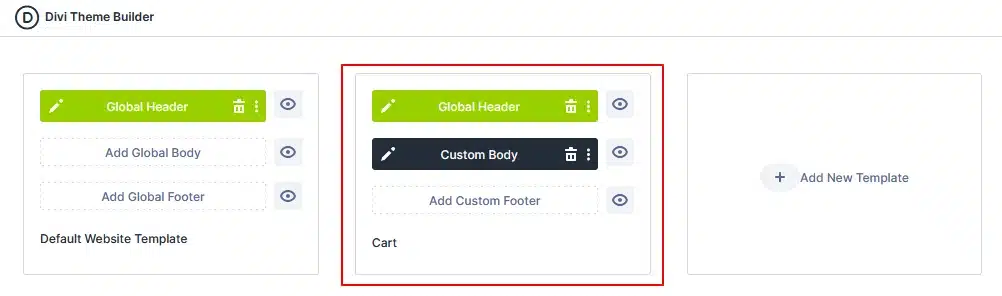
The first step is creating a dedicated template for your cart page.
To create the template:
- Navigate to Divi → Theme Builder
- Click Add New Template
- Select WooCommerce Cart Page
- Create a Custom Body Template
This ensures your design only appears on the cart page.
Optional Enhancement
Many ecommerce stores remove the standard navigation menu from the cart page to reduce distractions and keep customers focused on completing their purchase.
Step 2: Build the Cart Page Structure
Once inside the Divi Visual Builder, create a clean and conversion-focused layout.
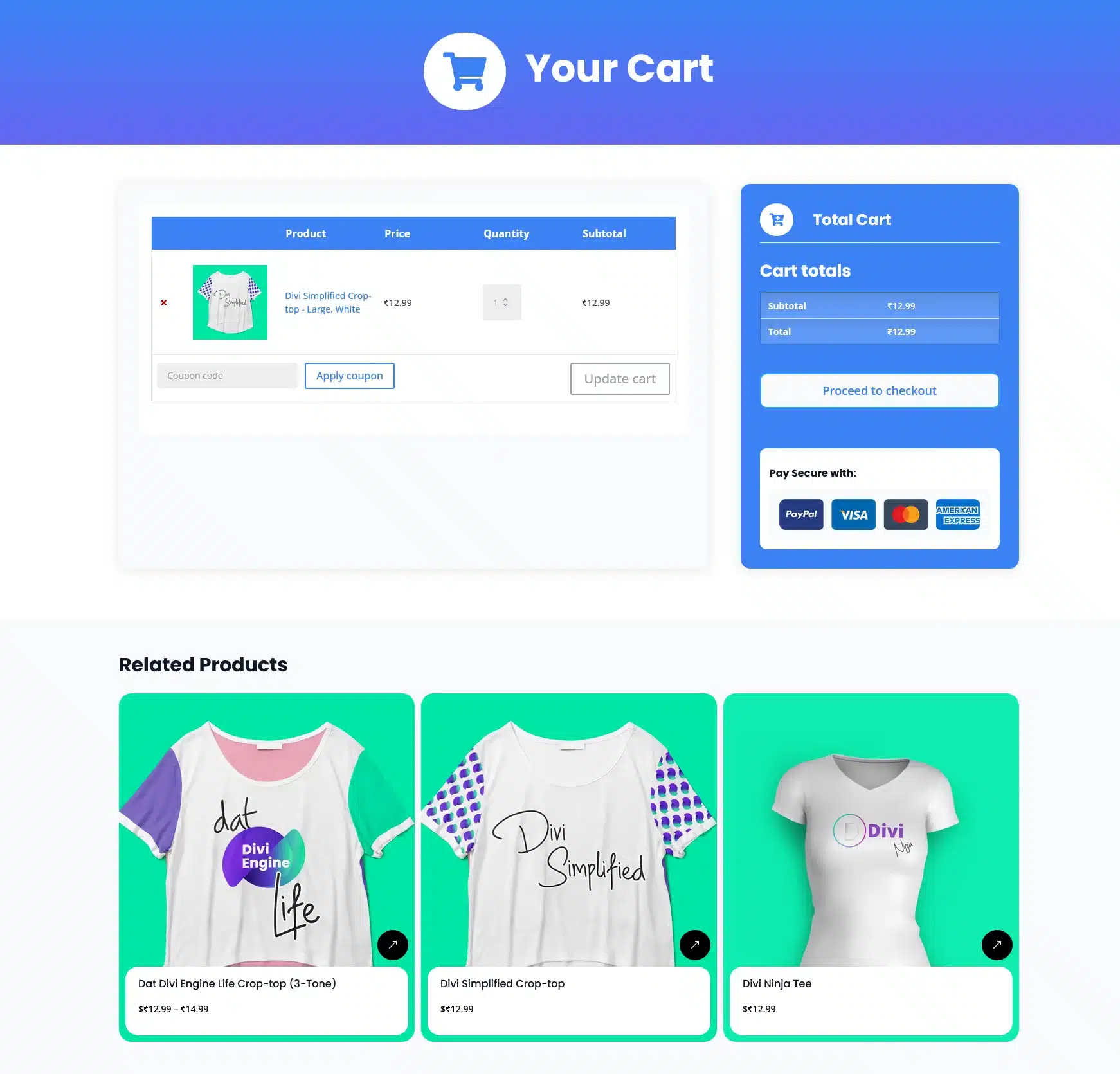
For this example, we created three primary sections:
Cart Header Section
The first section serves as a visual introduction.
Add:
- Icon Module
- Heading Module
Example:
🛒 Your Cart
A simple header helps users immediately understand where they are in the purchasing process.

WooCommerce Notice Section
Below the header, add a row containing the Woo Notice Module.
This area automatically displays:
- Coupon notifications
- Cart updates
- Success messages
- Error messages
Keeping notices in a dedicated section improves visibility and usability.

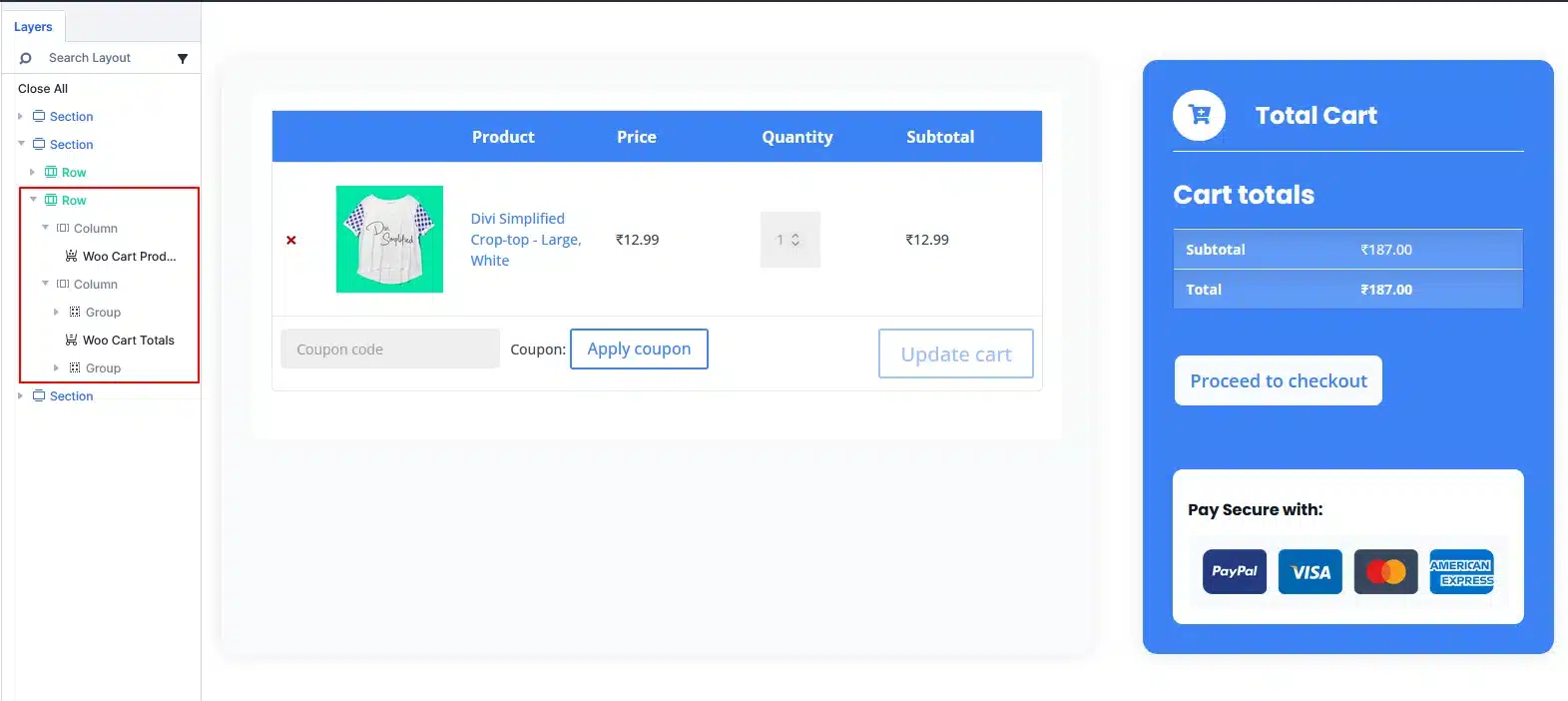
Main Cart Section
Create a two-column row.
Left Column: Cart Products
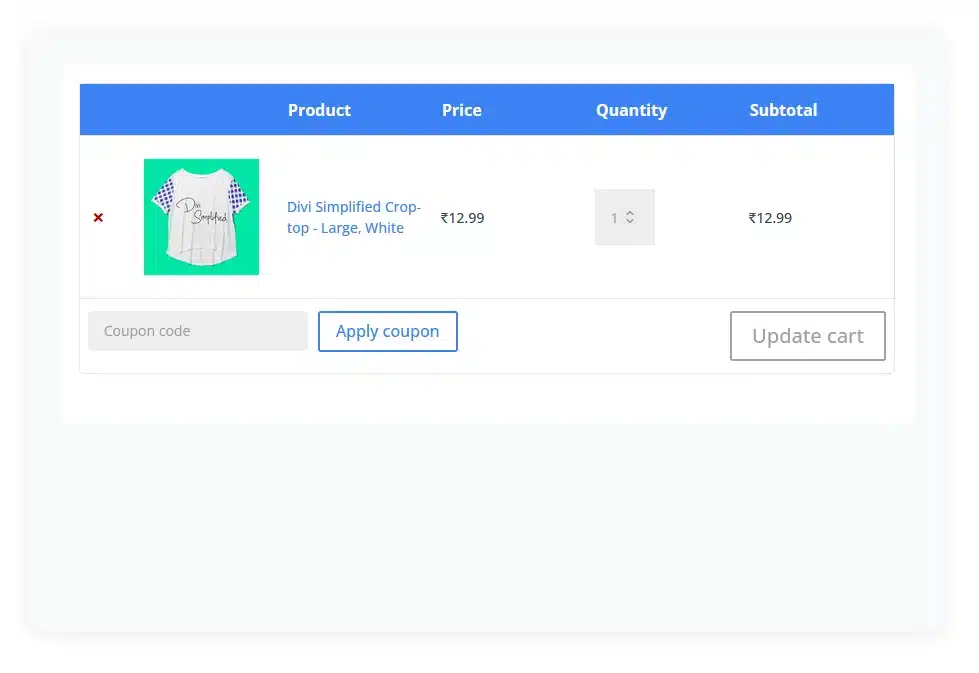
Add the Woo Cart Products Module.
This module automatically displays:
- Product Images
- Product Names
- Prices
- Quantity Controls
- Coupon Field
- Update Cart Button
This section allows customers to review and modify their cart contents before checkout.
Recommended Settings
For most stores:
- Keep Product Images enabled
- Show Coupon Field
- Show Update Cart Button
- Show Remove Item Icon
These options provide a familiar shopping experience and help customers manage their cart easily.
Right Column: Cart Summary Sidebar
The second column will contain your order summary.
For this layout, create a styled card using:
- Group Module
- Icon Module
- Heading Module
- Woo Cart Totals Module
This sidebar displays:
- Cart Subtotal
- Shipping Costs
- Taxes
- Order Total
- Proceed To Checkout Button
Keeping this information visible helps customers quickly understand their final purchase amount.
Step 3: Style the Cart Products Area
The Woo Cart Products module offers several design options that allow you to match your store branding.
You can customize:
- Table Layout
- Product Images
- Typography
- Coupon Form
- Quantity Inputs
- Buttons
- Borders
- Spacing
Best Practice
Use your site’s primary font and color palette to maintain consistency throughout the shopping experience.
Adding padding and subtle borders can also improve readability.
Step 4: Design a High-Converting Cart Summary Sidebar
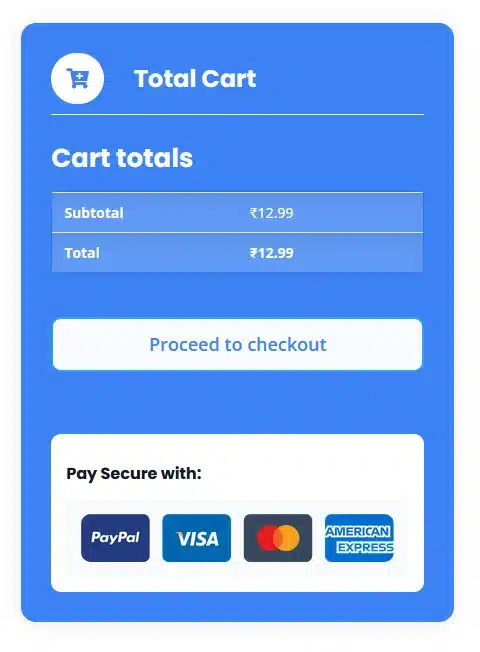
The Cart Totals section is arguably the most important part of the page because it contains the checkout call-to-action.
To make it stand out:
Add Visual Emphasis
Consider using:
- Background Color
- Border Radius
- Box Shadow
- Extra Padding
This helps separate the order summary from the rest of the page.
Style the Checkout Button
Your Proceed to Checkout button should be:
- Highly visible
- Easy to tap on mobile
- Consistent with your brand
A strong call-to-action encourages users to continue their purchase journey.
Step 5: Build Customer Trust
Many shoppers hesitate right before checkout.
Adding trust elements near the Cart Totals section can help reduce concerns and increase conversions.
Examples include:
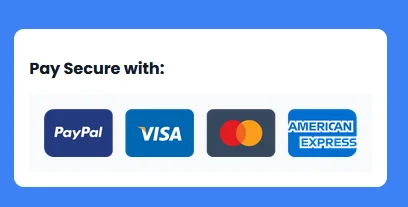
Payment Method Icons
Display accepted payment methods such as:
- Visa
- Mastercard
- PayPal
- American Express
Security Messages
Examples:
- Secure Checkout
- SSL Protected Payments
- 100% Safe Transactions
Customer Assurance
You can also display:
- Money-back guarantees
- Return policies
- Free shipping information
- Customer support links
These trust signals provide reassurance at a critical decision point.
Step 6: Add Product Recommendations
A custom cart page is a great place to showcase additional products and increase average order value.
In Divi 5, you can display recommended products using one of two methods:
Option 1: Woo Cross Sells Module
The easiest approach is to use Divi’s Woo Cross Sells Module.
Simply assign cross-sell products within WooCommerce, and the module will automatically display them on the cart page.
Benefits:
- Easy to set up
- Dynamically pulls WooCommerce cross-sell products
- Encourages additional purchases
Fully customizable with Divi 5 styling options
Option 2: Product Loop Builder
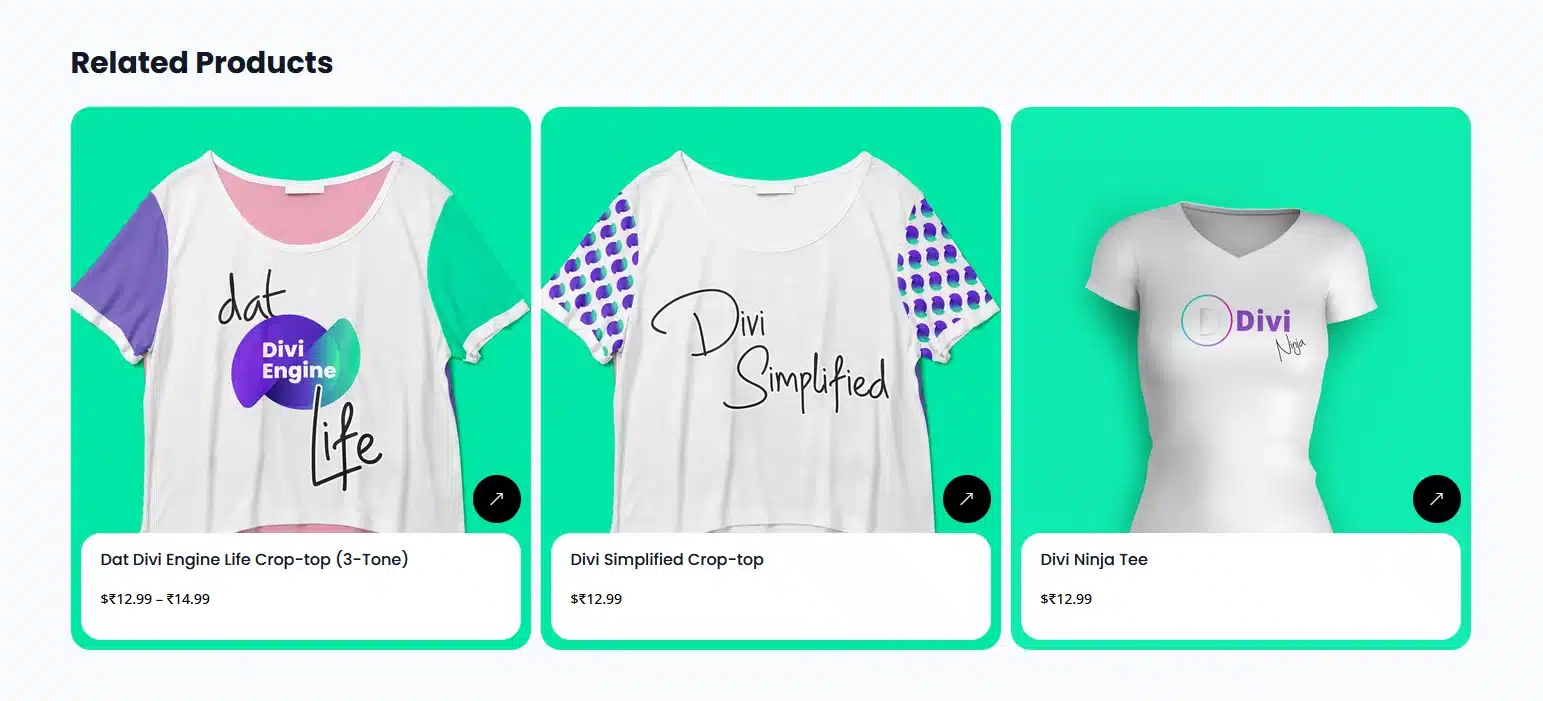
For more design flexibility, you can create a custom product recommendation section using Divi 5’s Loop Builder.
Build a custom product card layout that includes:
- Product Image
- Product Title
- Product Price
- Short Description
- Add to Cart or View Product Button
The Loop Builder dynamically pulls products from your WooCommerce store, allowing you to display featured products, specific categories, best sellers, or other custom product collections.
Benefits:
- Complete design control
- Display any product query
- Create branded product showcases
- Automatically updates as products change
Choose the approach that best fits your store’s goals. For simple recommendations, the Woo Cross Sells Module works perfectly. For advanced layouts and greater customization, the Product Loop Builder offers maximum flexibility.
Step 7: Optimize the Cart Page for Mobile Devices
A significant percentage of ecommerce purchases happen on mobile devices.
Before publishing your cart page, test it across Divi 5’s responsive breakpoints.
Mobile Optimization Checklist
- Product information is easy to read
- Quantity fields are accessible
- Checkout button is easy to tap
- Cart totals remain visible
- Product recommendations display properly
- Spacing remains comfortable on smaller screens
Divi 5’s responsive controls make it easy to adjust layouts for every screen size.
Best Practices for WooCommerce Cart Pages
When designing your custom cart page, remember:
- Keep the layout simple and focused
- Make checkout the primary action
- Clearly display pricing information
- Add trust signals near checkout
- Maintain consistent branding
- Optimize for mobile users
- Avoid unnecessary distractions
The goal is to help customers move confidently from cart to checkout.
Final Thoughts
Divi 5 makes it easier than ever to create a fully customized WooCommerce cart page without touching code. Using native WooCommerce modules, visual design controls, and responsive editing tools, you can build a shopping experience that aligns perfectly with your brand while improving usability and conversions.
By combining the Woo Cart Products Module, Woo Cart Totals Module, trust-building elements, and product recommendations, you can transform a standard cart page into a powerful sales and conversion tool.
If you’re building or redesigning a WooCommerce store with Divi 5, investing time in a custom cart page is one of the most effective ways to improve the customer experience and increase sales.
Need Help Building a Custom WooCommerce Store?
Creating a custom WooCommerce cart page is just one step toward building a high-converting online store. Whether you need a complete WooCommerce website, custom Divi 5 development, WordPress plugin customization, or performance optimization, our experienced developers can help you create a fast, scalable, and conversion-focused eCommerce website tailored to your business.
If you’re a digital agency, our White Label WordPress Development Services let you deliver high-quality WordPress and WooCommerce projects to your clients under your own brand.
Looking for a reliable WordPress development partner? Explore our WordPress Development Services and let us help you build your next WooCommerce website.